
Unreal Engine 5 (UE5) continues to empower developers with robust tools designed to streamline complex game creation processes. Among these, Data Tables stand out as a particularly indispensable feature, offering a structured and efficient method for managing large sets of information within a project. They provide a centralized repository for game-related data, enabling programmers and designers to define, populate, and access pre-made lists of information with remarkable ease. This approach fundamentally shifts game development towards a data-driven paradigm, enhancing flexibility, scalability, and collaborative efficiency.
Understanding the Core Functionality of Data Tables
At its essence, a Data Table in Unreal Engine 5 serves as a highly organized, asset-based repository for structured data. Imagine a sophisticated spreadsheet directly integrated into your game engine, where each row represents a distinct entry and each column corresponds to a specific data attribute. This data is defined by a chosen struct (structure), which acts as a blueprint, dictating the types of values each row will hold. The system then uses a unique key, typically a FName (Fast Name), to identify and retrieve specific rows. This key-value pairing mechanism makes Data Tables incredibly efficient for lookups and ensures data consistency across the project.
The power of Data Tables lies in their persistence and accessibility. Stored as assets within your Unreal Engine project, the data is not only easily retrievable from any part of your game’s code (whether C++ or Blueprints) but also remains persistent within the editor itself. This means developers can design and populate their data tables during the development phase, and this data will be seamlessly available for use during runtime. For instance, consider a role-playing game: instead of hardcoding the attributes of every item, enemy, or spell, developers can define a single Data Table that houses all relevant statistics, such as damage values, rarity levels, sell prices, health points, or unique abilities. This centralized approach simplifies balancing, content updates, and overall project management, drastically reducing the potential for errors and inconsistencies that often plague projects reliant on scattered, hardcoded values. The ability to quickly update values in a single location and have those changes reflected immediately across the entire game is a cornerstone of agile game development, directly facilitated by Data Tables.
Laying the Foundation: Enums and Structs as Precursors
Before a Data Table can be effectively utilized, it requires foundational elements to define its structure and content. These precursors are Enumerations (Enums) and Structures (Structs), both integral to establishing a robust data-driven architecture within Unreal Engine.
The Role of Enumerations (Enums)
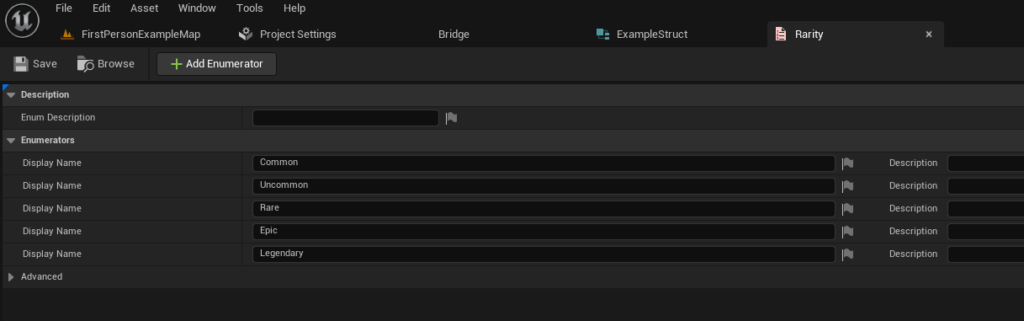
An Enumeration, or Enum, provides a way to define a set of named integer constants, offering a more human-readable and type-safe alternative to raw numerical values. In the context of Data Tables, Enums are invaluable for categorizing data with a finite, predefined set of options. For example, when defining item quality in a role-playing game, an Enum for "Item Rarity" can be created with values such as "Common," "Uncommon," "Rare," "Epic," and "Legendary."
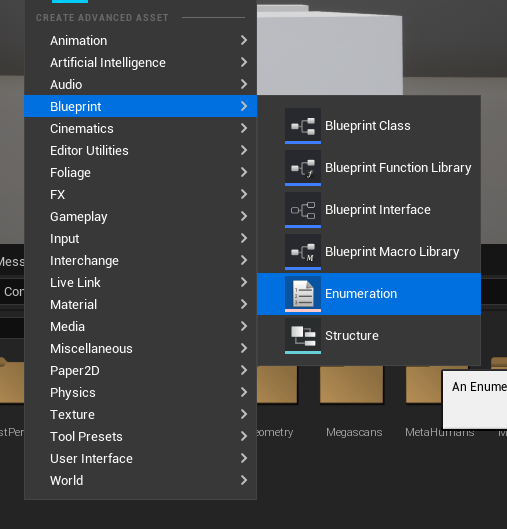
To create an Enum in Unreal Engine 5, developers typically right-click within the Content Browser, navigate to the "Blueprints" category, and select "Enumeration." Once created, descriptive names are assigned to each value, ensuring clarity and preventing common typos or misinterpretations that could arise from using arbitrary numbers. This not only makes the data table more understandable for designers and content creators but also enforces data integrity, as only the predefined Enum values can be selected for that particular field. This significantly reduces errors and ensures consistency across thousands of potential item entries.
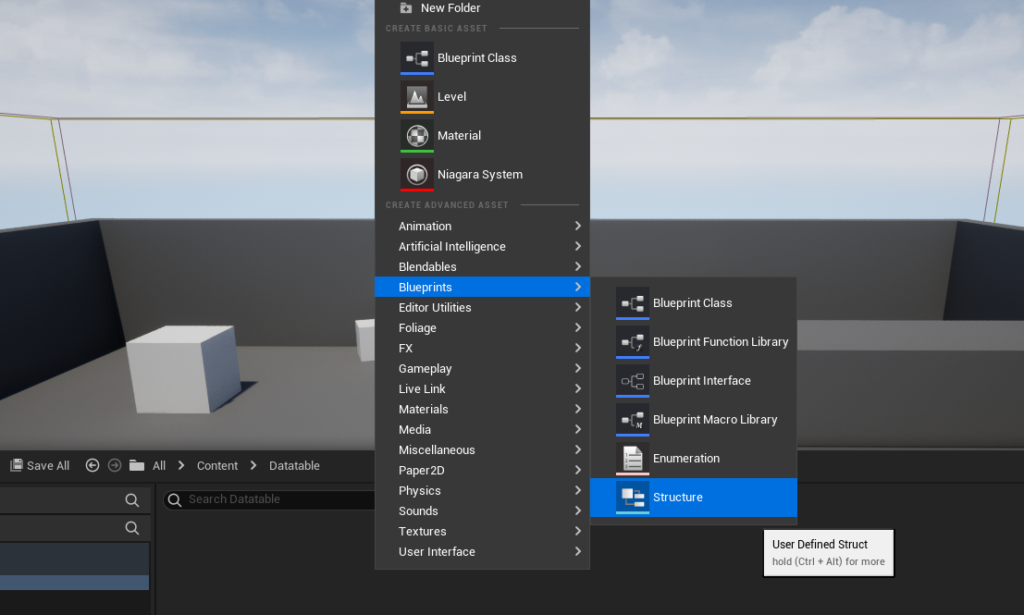
Constructing Data Structures (Structs)
Following the creation of necessary Enums, the next critical step is to define the Structure (Struct) that will serve as the schema for the Data Table. A Struct in Unreal Engine is a custom data type that groups together a collection of variables (or "members") of different types under a single name. It acts as the blueprint for each individual row in the Data Table, dictating the precise attributes that every entry will possess.
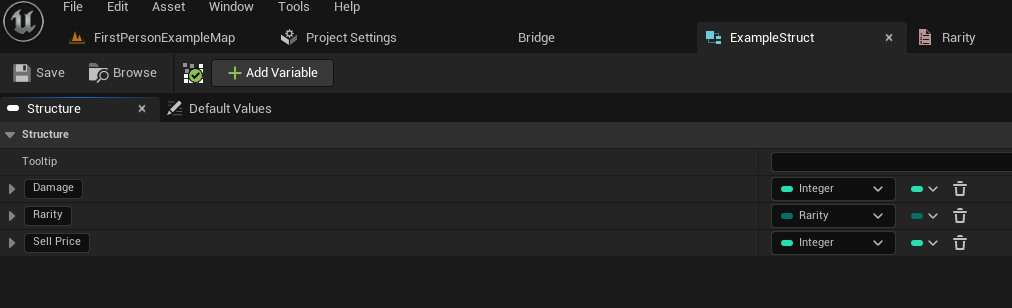
For our item example, an "ItemData" struct might contain members like Damage (an integer), Rarity (an instance of our previously created "Item Rarity" Enum), and SellPrice (another integer). Creating a Struct is similar to creating an Enum: right-click in the Content Browser, select "Structure" from the "Blueprints" category. Within the Struct editor, developers add new variables, assigning them appropriate types and names. The careful design of this Struct is paramount, as it determines the columns and data types available for population in the subsequent Data Table. By encapsulating related data within a single Struct, developers achieve a higher level of organization and modularity, making it easier to manage and manipulate complex game objects. This also fosters better collaboration, as all team members understand the expected data format for each entry.
Assembling the Data Table: Creation and Population
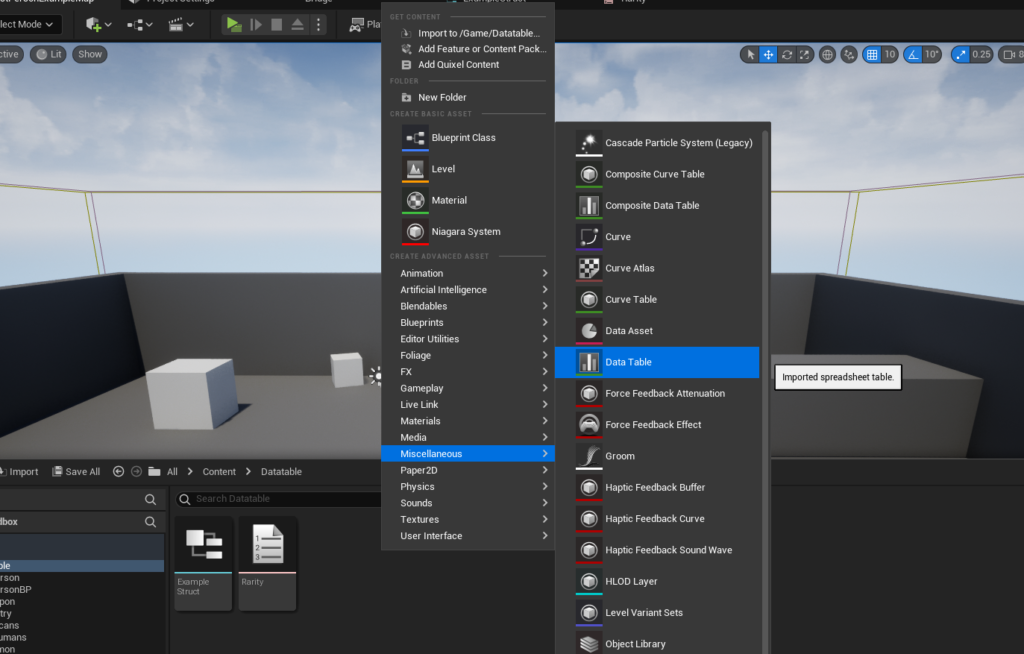
With the foundational Enums and Structs in place, the actual creation of the Data Table becomes a straightforward process, directly linking to the defined data schema.
The Creation Process
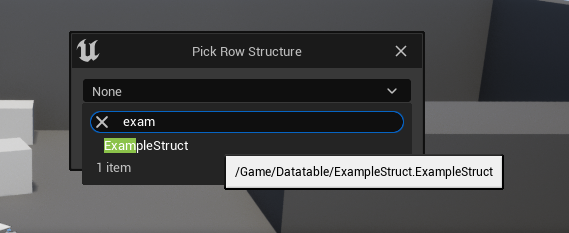
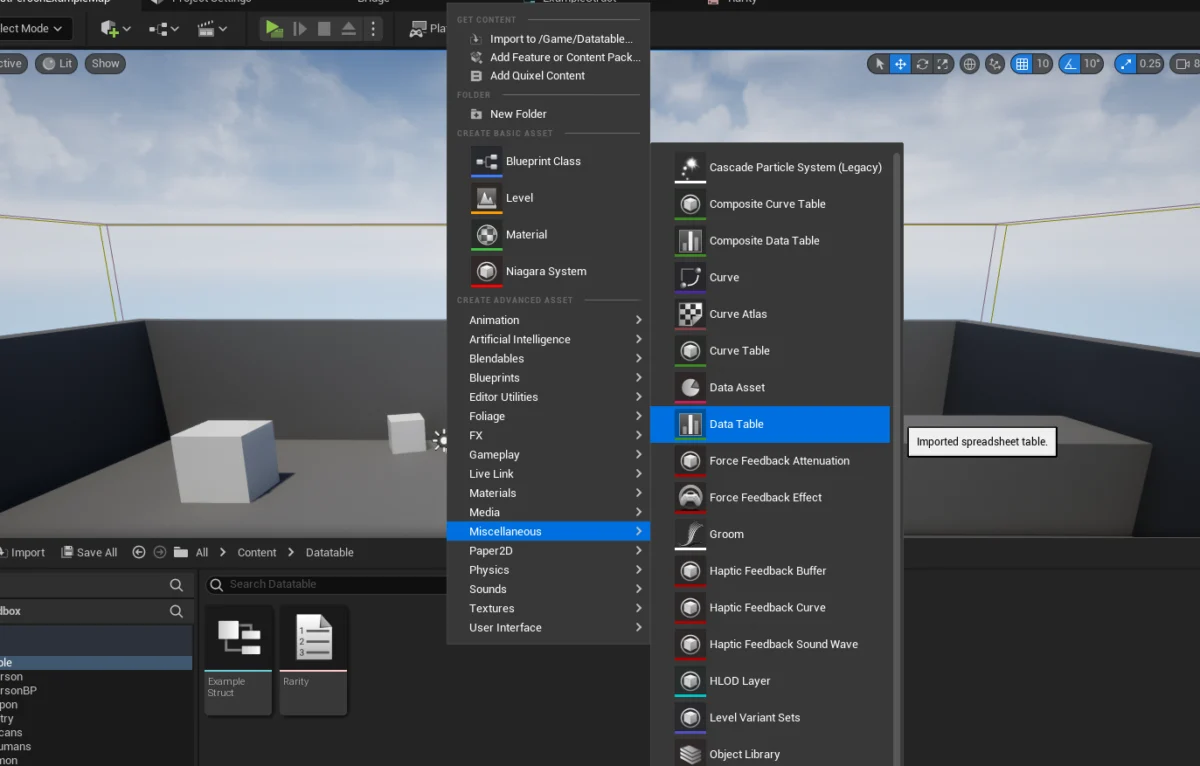
To create a Data Table, developers again right-click in the Content Browser, but this time navigate to the "Miscellaneous" category and select "Data Table." Upon selection, a crucial prompt appears, asking the developer to choose which Struct the Data Table will be based on. This step is pivotal, as the chosen Struct (ItemData in our example) immediately defines the columns and their respective data types for every row that will be added to this table. This direct linkage ensures that all data entered adheres to a predefined, consistent format, preventing the entry of incorrect data types and maintaining structural integrity.
Populating the Data Table with Entries
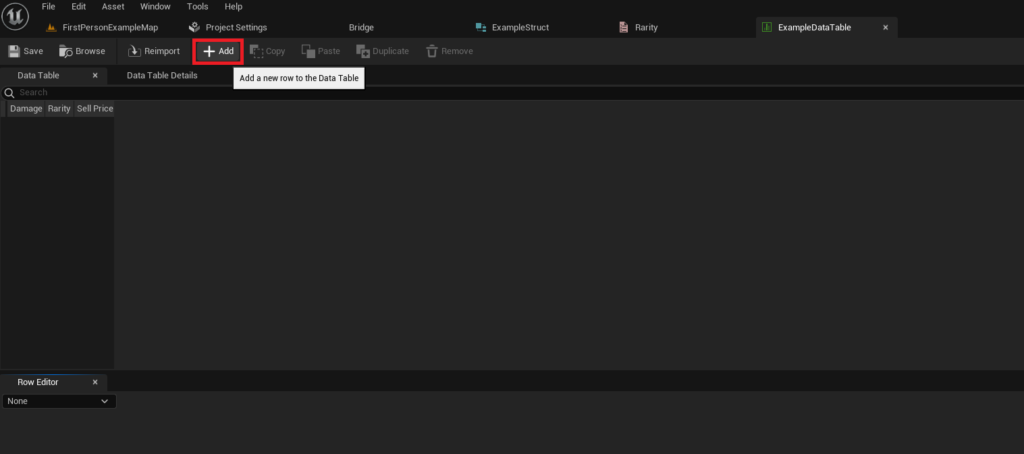
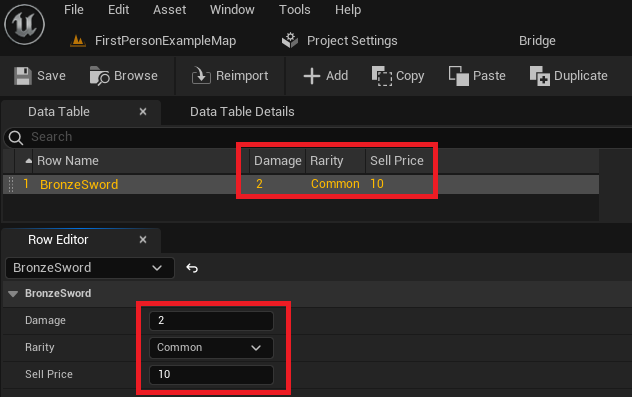
Once the Data Table is created and configured with its corresponding Struct, the next phase involves populating it with actual game data. The Unreal Editor provides an intuitive interface for this task. Developers can click the "Add" button within the Data Table editor to create new rows. Each new row will automatically display the default values for the variables defined in the underlying Struct.
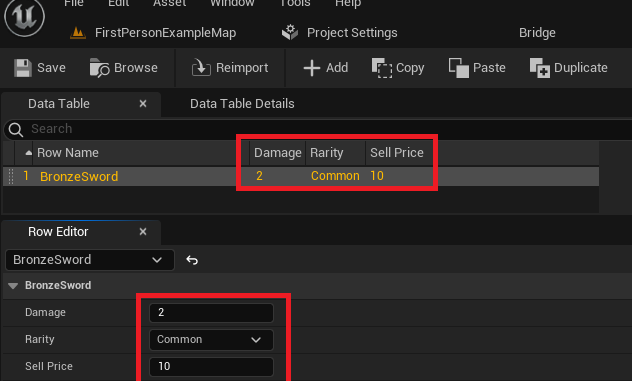
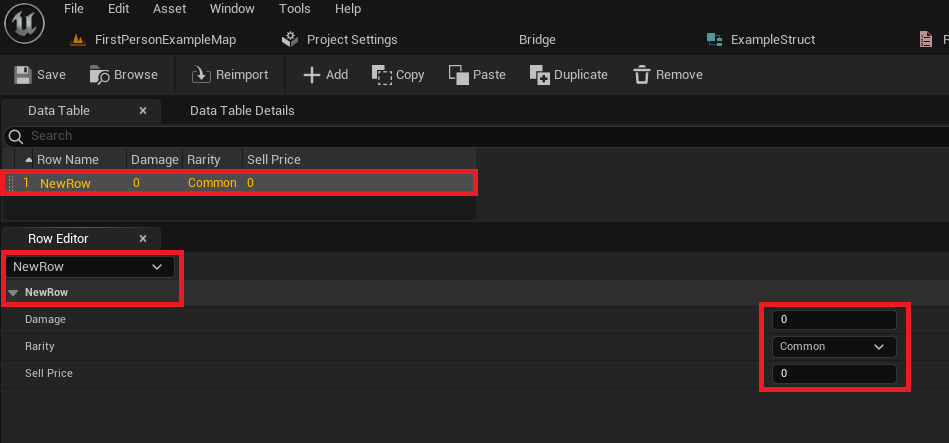
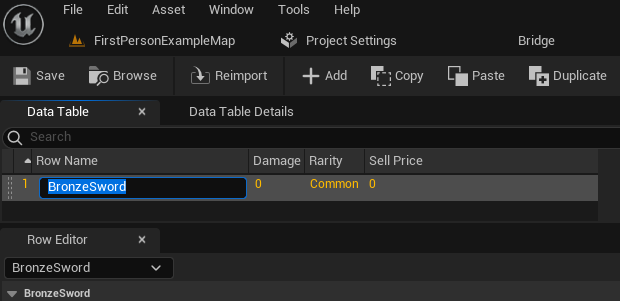
The Data Table interface typically presents two main views: the table itself, showing a summary of each row’s values, and a "Row Editor" panel, which allows for detailed modification of the currently selected row. Here, designers and content creators can easily change the default values for Damage, Rarity, Sell Price, and any other attributes defined in the Struct. A critical aspect of Data Table population is the assignment of a unique "Row Name" to each entry. This name acts as the primary key for data retrieval. For instance, an entry for a basic weapon might be named "BronzeSword," while a more powerful variant could be "SilverSword." These descriptive, unique names are essential for efficient data lookup during runtime. The visual, spreadsheet-like interface allows content creators, who may not have programming expertise, to directly contribute to the game’s data, accelerating content iteration and balancing efforts. The importance of frequent saving cannot be overstated, as changes made within the Data Table editor are only persisted upon saving the asset.
Dynamic Data Access: Utilizing Data Tables in Game Logic
Populating a Data Table is only half the equation; the real power emerges when this data can be dynamically accessed and utilized within the game’s logic. Unreal Engine provides robust Blueprint nodes and C++ APIs for retrieving and iterating over Data Table entries.
Retrieving Specific Rows with Get Data Table Row
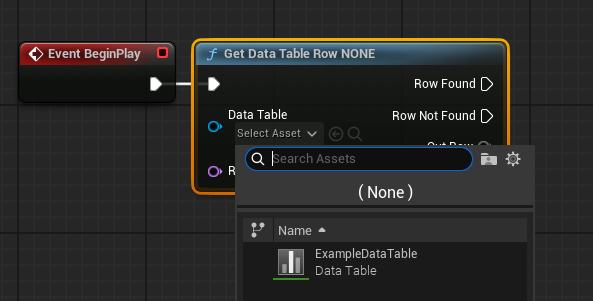
The most common method for accessing data from a Data Table is through the Get Data Table Row Blueprint node (or its C++ equivalent). This node requires two primary inputs: a reference to the Data Table asset itself and the specific Row Name (the unique key) of the entry to be retrieved.
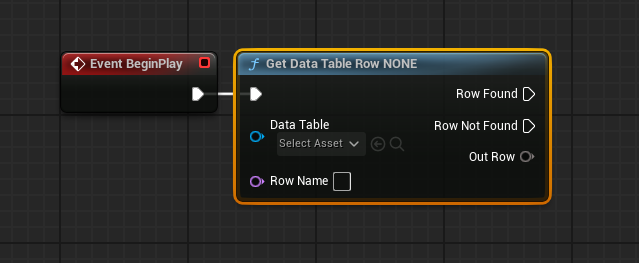
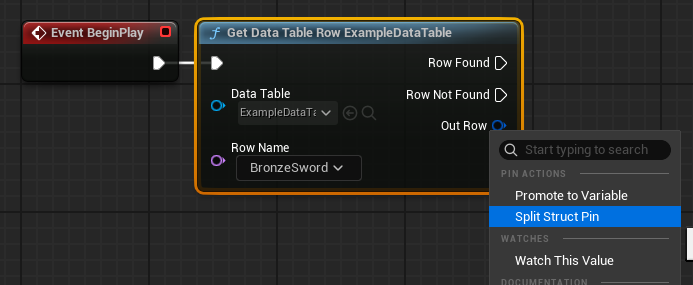
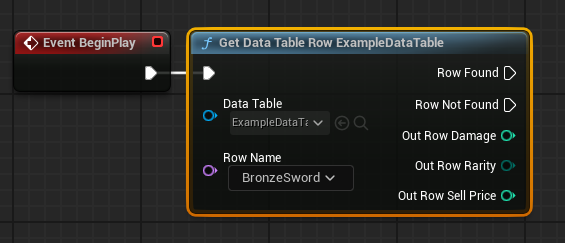
Upon execution, the Get Data Table Row node attempts to find the specified row. It provides two output execution pins: "Row Found" and "Row Not Found." This built-in error handling is crucial, allowing developers to implement fallback logic if a requested row does not exist. If the row is found, the "Out Row" pin will contain a copy of the Struct data associated with that row. Developers can then right-click on the "Out Row" pin and select "Split Struct Pin" to easily expose all the individual variables (e.g., Damage, Rarity, SellPrice) contained within that Struct. This allows for direct access to the specific data points needed for game logic, such as applying damage to an enemy or determining an item’s value. The Row Name input pin also offers a convenient dropdown menu within the Blueprint editor, listing all available row names from the selected Data Table, further simplifying the selection process and reducing potential input errors. This direct access by key is highly optimized, making it suitable for frequent data lookups during gameplay.
Iterating Over Data Tables: Get Data Table Row Names and For Each Loop
While retrieving a specific row is essential, there are many scenarios where game logic needs to process all or a subset of entries within a Data Table. For instance, a game might need to display all available items in a shop, calculate the average damage of all weapons, or filter items based on rarity. For these situations, iterating over the Data Table is necessary.
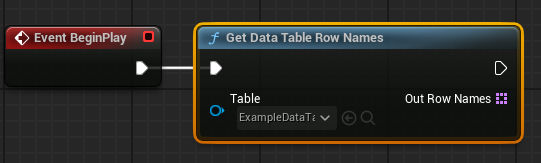
Unreal Engine facilitates this through the Get Data Table Row Names node, which, when provided with a Data Table reference, returns an array containing all the FName (Row Names) of the entries within that table. This array of names can then be fed into a standard For Each Loop node. The For Each Loop will sequentially execute its "Loop Body" pin for each Row Name in the array. Inside the loop, the "Array Element" pin provides the current Row Name. This Row Name can then be connected to the Row Name input of a Get Data Table Row node. This setup allows developers to retrieve and process the full Struct data for each entry in the Data Table, one by one. This powerful combination enables dynamic generation of UI elements, complex filtering, statistical analysis, and any other logic that requires processing multiple data entries, ensuring maximum flexibility in how game content is utilized.
Broader Impact and Strategic Implications for Game Development
The implementation of Data Tables in Unreal Engine 5 transcends mere data storage; it represents a strategic shift towards more modular, scalable, and collaborative game development practices. By externalizing critical game parameters from code, Data Tables empower a diverse range of development roles.
For Game Designers, Data Tables provide direct control over game balance and content without needing programmer intervention. They can rapidly iterate on item stats, character abilities, quest parameters, or enemy behaviors, testing changes in real-time. This agility significantly shortens design cycles and fosters experimentation. Content Creators and Artists can define metadata for their assets, such as specific material properties, animation triggers, or visual effects linked to rarity levels, ensuring consistent application across the project. Programmers benefit from cleaner codebases, as game logic focuses on how to use data rather than hardcoding specific values. This separation of concerns improves code readability, maintainability, and reduces the likelihood of introducing bugs during content updates.
Beyond individual roles, Data Tables have a profound impact on project-wide efficiency:
- Scalability: As games grow in complexity, managing thousands of items, characters, or quests becomes unwieldy with hardcoded values. Data Tables handle this scale elegantly, allowing for organized expansion without impacting performance or development speed.
- Localization: Data Tables are ideal for managing localized text strings. By associating a unique
Row Namewith each piece of text and having columns for different languages, developers can easily swap text based on the player’s chosen language, simplifying a notoriously complex aspect of global game releases. - Collaboration: Providing a single source of truth for game data, Data Tables facilitate seamless collaboration among large teams. Designers, programmers, and QA testers all refer to the same data, minimizing miscommunication and ensuring that everyone is working with the most current information. Version control systems seamlessly integrate with Data Table assets, allowing for tracking changes and resolving conflicts efficiently.
- Moddability and User-Generated Content: For games designed to be moddable, Data Tables offer a clean interface for external parties to inject new content or modify existing parameters without altering core game code, extending the lifespan and community engagement of a title.
In conclusion, mastering Data Tables in Unreal Engine 5 is not merely about learning another engine feature; it’s about embracing a data-driven philosophy that is critical for modern game development. From the careful construction of Enums and Structs to the efficient population and dynamic retrieval of data, these tools provide a robust framework for managing virtually any aspect of a game’s content. By enabling faster iteration, improved collaboration, and a more scalable architecture, Data Tables empower development teams to build richer, more complex, and ultimately more successful gaming experiences. The investment in understanding and implementing this feature yields substantial dividends across the entire development lifecycle, solidifying its status as an indispensable asset in any Unreal Engine project.
About the Author








