
Setting up a dedicated server for an Unreal Engine 5 game is a pivotal undertaking for developers aiming to deliver scalable, secure, and high-performance multiplayer experiences. This comprehensive guide outlines the essential steps and underlying principles involved in building and configuring such a server, from initial project preparation to local deployment and testing, ensuring a robust foundation for competitive shooters, cooperative survival adventures, or expansive social sandboxes.
The Indispensable Role of Dedicated Servers in Modern Gaming
In the landscape of contemporary video games, the shift from player-hosted (peer-to-peer or listen server) models to dedicated server infrastructure has become increasingly pronounced. This evolution is driven by the imperative to provide a consistent, fair, and secure environment for online gameplay. Unlike a listen server, which leverages one player’s machine to host the game session, a dedicated server operates independently on a remote machine, solely focused on processing game logic and managing connections without rendering graphics or requiring player input. This separation of concerns offers distinct advantages that are critical for titles aspiring to reach a broad audience and maintain long-term engagement.
Industry reports consistently highlight the correlation between server quality and player retention. For instance, surveys by gaming analytics firms often indicate that players are significantly more likely to abandon games plagued by connectivity issues, lag, or perceived unfairness due to host advantage. Dedicated servers mitigate these risks by offering superior performance, enhanced security, and unwavering reliability, forming the backbone of truly competitive and immersive multiplayer worlds.
Evolution of Multiplayer Hosting: A Brief History
The journey of multiplayer gaming infrastructure has seen significant advancements. Early online games predominantly relied on peer-to-peer connections or listen servers, where one player’s computer acted as both a client and the server. This model, while cost-effective for developers, introduced inherent vulnerabilities: the host player often experienced lower latency (host advantage), the game session was tethered to the host’s uptime and internet quality, and cheating was more prevalent as the game state was partially exposed on a player’s machine.
As internet speeds improved and the demand for larger-scale, more competitive, and persistent online experiences grew, the limitations of listen servers became glaring. The rise of esports, massive multiplayer online (MMO) games, and battle royales necessitated a more robust solution. Dedicated servers emerged as the standard, offering a centralized, authoritative source of truth for the game world. This architectural shift allowed for professional-grade anti-cheat measures, consistent tick rates (the frequency at which the server updates the game state), and the ability to manage complex game logic without burdening individual player machines. Today, with Unreal Engine 5 pushing the boundaries of visual fidelity and complex game mechanics, stable and performant networking via dedicated servers is more critical than ever.
Foundational Requirements for UE5 Dedicated Server Development
Embarking on the journey of building a dedicated server for an Unreal Engine 5 project necessitates adherence to several crucial prerequisites, setting the stage for a successful build and deployment. These requirements ensure that the development environment is appropriately configured to compile the server-specific binaries.
Firstly, a working multiplayer Unreal Engine 5 project is non-negotiable. This implies that the game logic, replication, and basic networking functionality (e.g., player movement, interaction) have already been established and tested in a listen server or editor-based multiplayer environment. The current guide often builds upon a prior understanding of Unreal Engine 5 Multiplayer Sessions, underscoring the importance of having a robust session management system in place for players to discover and join game instances.
Secondly, and critically, developers must utilize a source build of Unreal Engine, rather than a version downloaded directly from the Epic Games Launcher. This requirement stems from the fact that the Launcher version does not include the necessary build targets and configurations to compile a dedicated server executable. A source build, obtained from Epic Games’ GitHub repository, grants developers the full flexibility and control needed to compile server-specific code, optimize engine modules, and integrate custom server functionalities. This distinction is paramount for server-side development within the Unreal ecosystem.
Finally, for projects leveraging the session system, the AdvancedSessions plugin is an essential component. This widely-used community plugin extends Unreal Engine’s native session capabilities, providing more robust and user-friendly functionalities for creating, finding, and joining multiplayer sessions. Its installation is crucial for ensuring that the dedicated server correctly broadcasts its presence and allows clients to connect seamlessly through the session browser. Neglecting this plugin can lead to difficulties in server discovery and connection for players.
Architectural Distinction: Dedicated vs. Listen Servers
Understanding the fundamental differences between dedicated and listen servers is key to appreciating the benefits and complexities of the former.
A listen server is characterized by its dual role: it acts as both a game client for the hosting player and the server for all other connected clients. This model is often favored for smaller-scale multiplayer games, typically supporting 2 to 16 players, due to its simplicity and lower operational costs. Developers benefit from faster iteration and testing, as the host client is directly available for debugging. However, this convenience comes at a price. Listen servers are susceptible to host advantage, where the host player experiences minimal latency. They are also prone to cheating, as the game state is partially controlled by a player’s machine. Furthermore, the performance of the entire session is dictated by the host’s hardware and network connection, leading to potential slowdowns or disconnections that impact all players.
In contrast, a dedicated server is a distinct, standalone application designed solely to host the game world and process server-side logic. It does not render graphics, does not have a player character, and does not count as a connected player. This architecture offers significant advantages:
- Performance: By offloading rendering and player input, a dedicated server can focus its resources on game logic, physics, and network synchronization, leading to lower latency, higher tick rates, and a smoother experience for all connected clients, regardless of their geographical location or individual machine performance.
- Security: As the authoritative source of the game state, dedicated servers are far more resistant to client-side cheating. Anti-cheat measures can be more effectively implemented and enforced on the server, ensuring a fair play environment.
- Reliability: Dedicated servers can be hosted on professional-grade hardware in data centers, offering 24/7 uptime and robust network connections. This guarantees game availability and minimizes disruptions, a critical factor for competitive or persistent online worlds.
- Scalability: Dedicated server instances can be spun up or down dynamically to accommodate fluctuating player numbers, making it an ideal solution for games expecting large player counts or needing to scale globally.
Configuring the Server Environment: Automating Sessions and Map Loading
A crucial aspect of preparing an Unreal Engine 5 project for dedicated server deployment involves streamlining its startup sequence. Unlike a player client, a dedicated server should not present a main menu or wait for user input. Instead, it needs to automatically initialize a game session and load the appropriate game map upon launch.
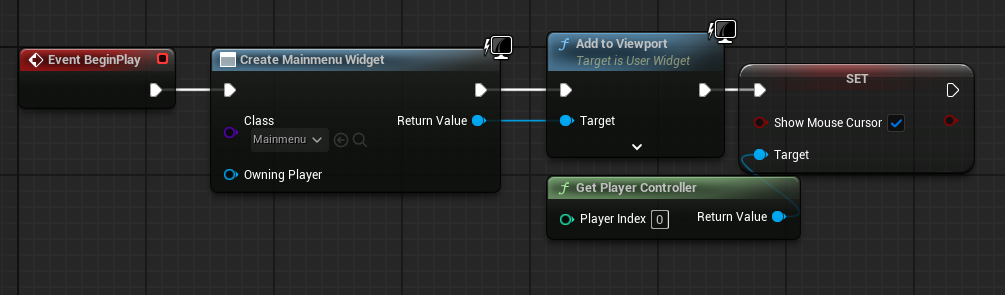
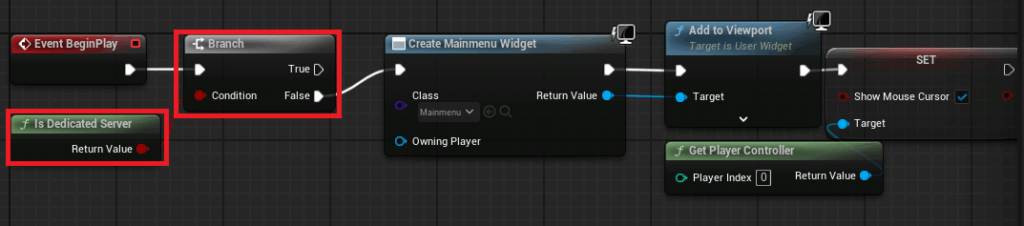
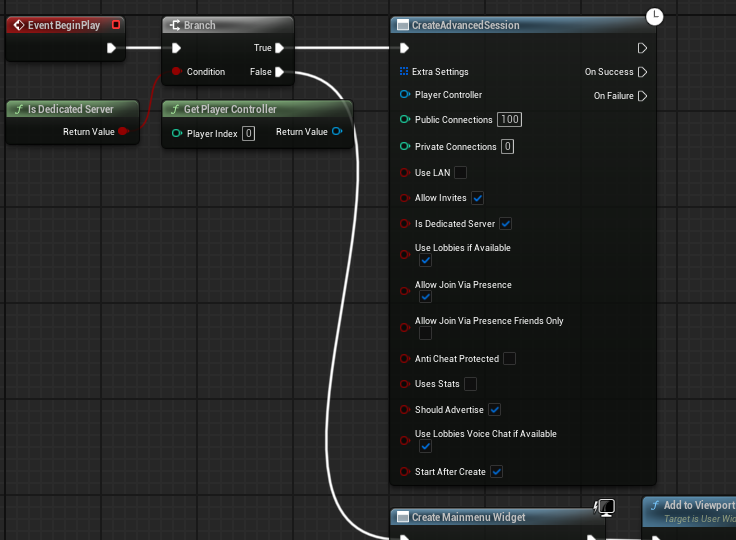
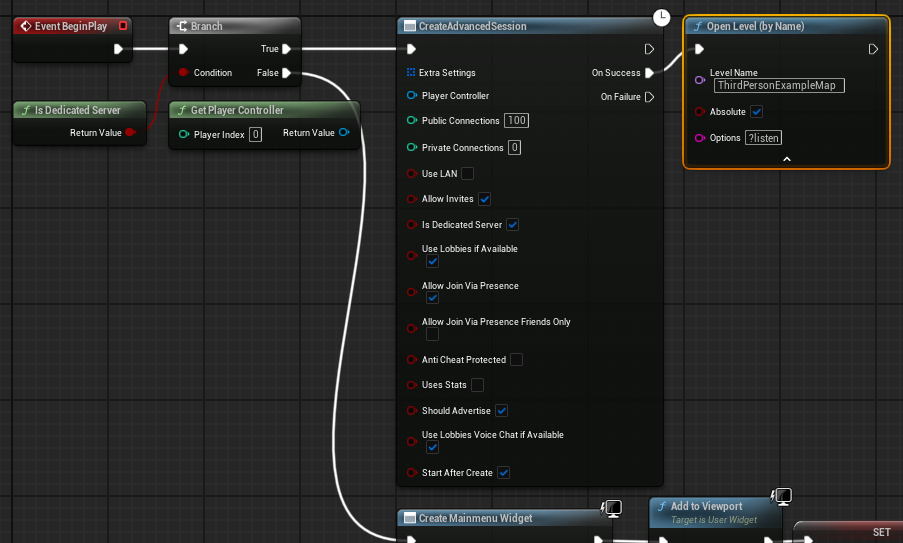
The common approach involves modifying the project’s main menu level blueprint. A conditional check using the "Is Dedicated Server" node determines if the current instance is a dedicated server. If true, the code bypasses the main menu widget creation entirely. Instead, it proceeds directly to creating an advanced session using the Create Advanced Session node. This session is configured with desired parameters (e.g., max players, public visibility). Upon successful session creation, the server then loads the designated game level using an Open Level node, critically appending the ?listen option to the map name. This command-line argument instructs the server to listen for incoming client connections on that specific map, effectively making it ready for players to join. This automated process is vital for efficient server operation and resource management.
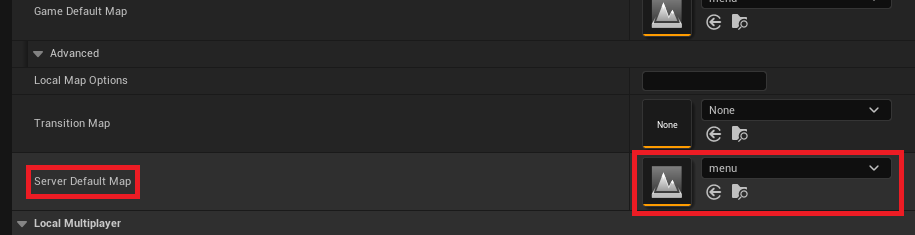
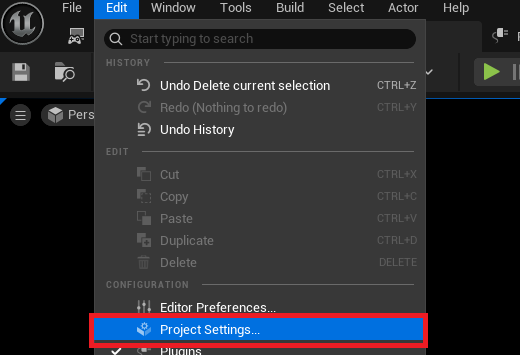
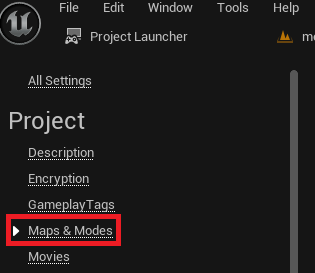
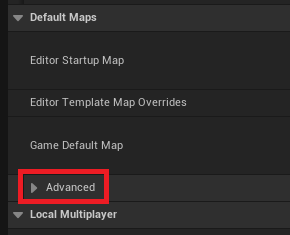
Furthermore, setting a default server map is essential. By default, Unreal Engine’s dedicated server might attempt to load an internal engine map, such as "Entry," which is not suitable for gameplay. To rectify this, developers navigate to the Project Settings, then select the "Maps & Modes" section. Under the "Default Maps" category, an advanced dropdown option reveals the "Server Default Map" setting. Here, the appropriate game map (e.g., the main game level or a specific lobby map) is chosen. This ensures that when the dedicated server starts, it initializes the correct game environment for players.
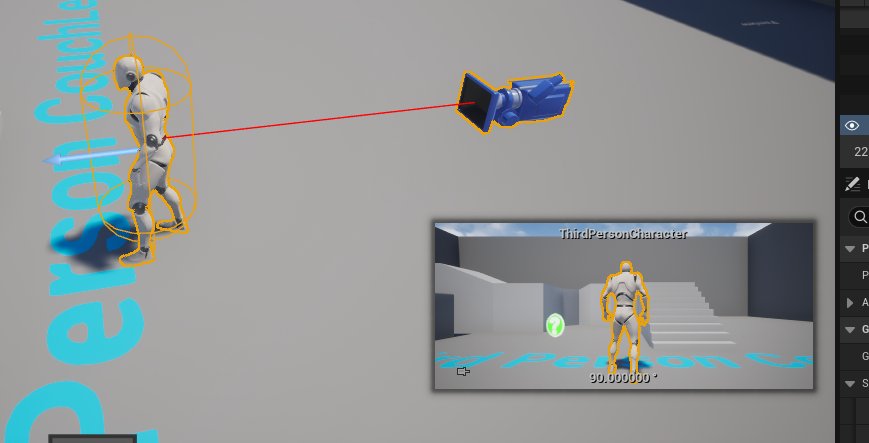
Finally, for resource optimization and logical consistency, it is imperative to ensure no default character is spawned in the level when running on a dedicated server. In a typical client-server setup, the first connected player often controls a character blueprint placed directly in the level. For a dedicated server, which doesn’t host a player client, such a character would be redundant and consume unnecessary resources. Developers should either remove these default character spawns from the server’s default map or implement logic to prevent their creation specifically on dedicated server instances, reinforcing the server’s role as a non-playing host.
The Project Launcher: Streamlining Server Builds
Unreal Engine’s Project Launcher is an indispensable built-in tool that significantly simplifies the complex process of building and packaging different versions of a game, including dedicated servers. It acts as a central hub for creating and managing custom build profiles, automating tasks that would otherwise require intricate command-line executions.
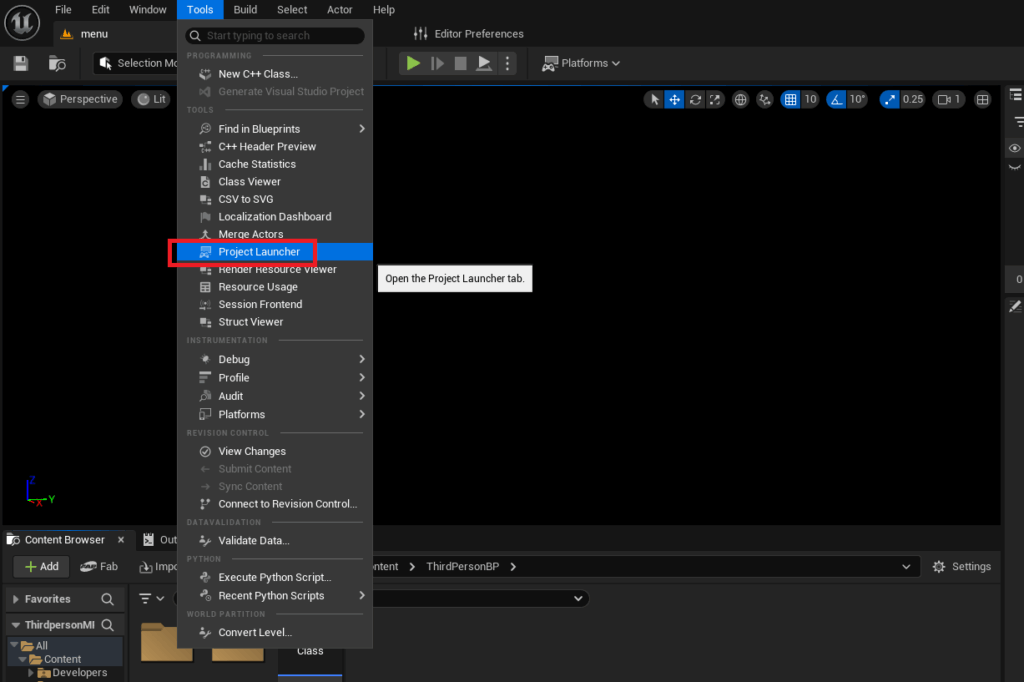
Accessing the Project Launcher is straightforward: from the Unreal Editor, navigate to the "Tools" menu and select "Project Launcher" within the tools section. Upon opening, developers are presented with an interface to create and manage various launch profiles.
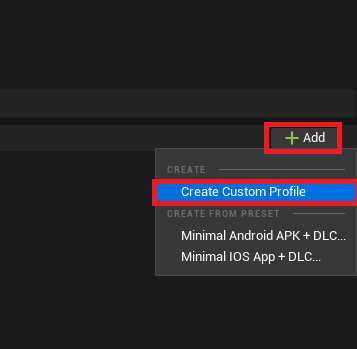
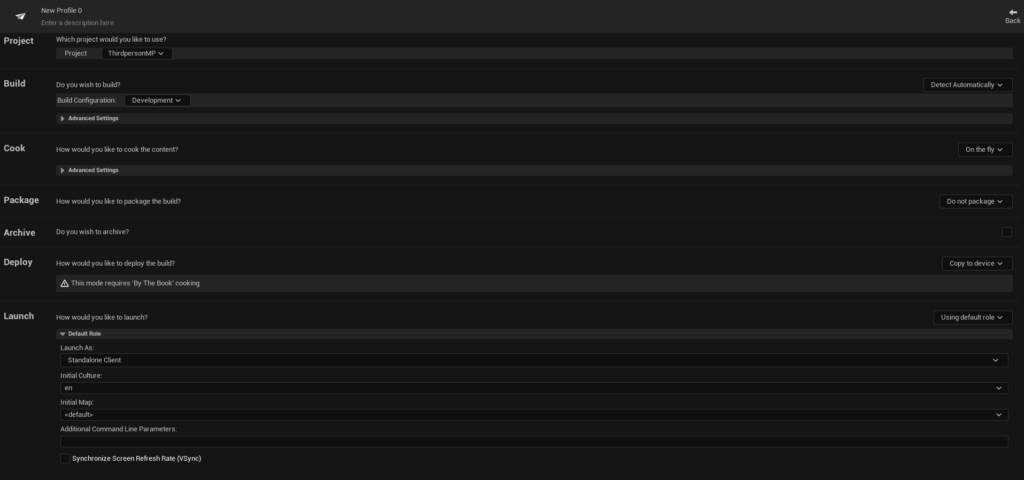
To build a dedicated server, a custom profile must be created. This involves clicking the "Add" button and selecting "Create Custom Profile." Within this profile, several critical configurations are made:
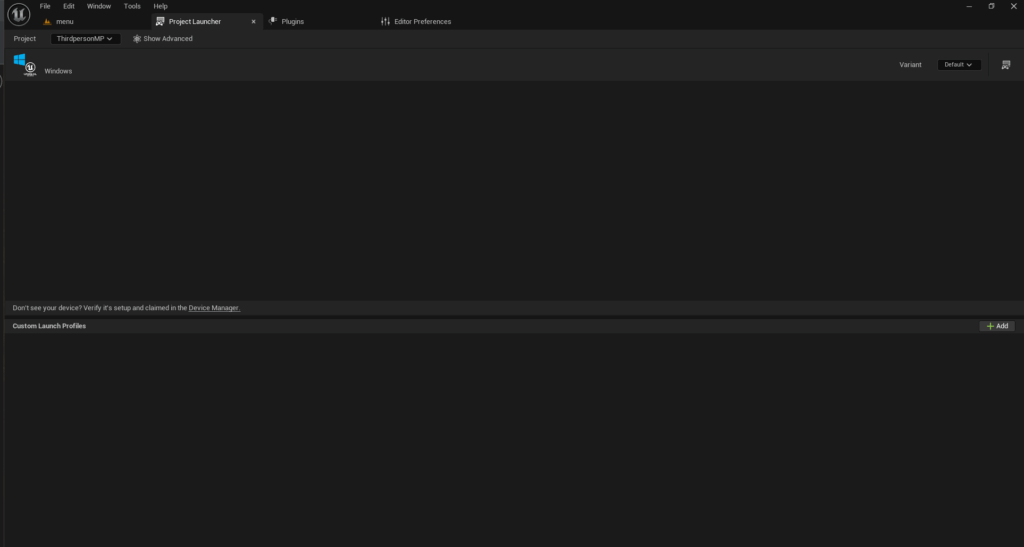
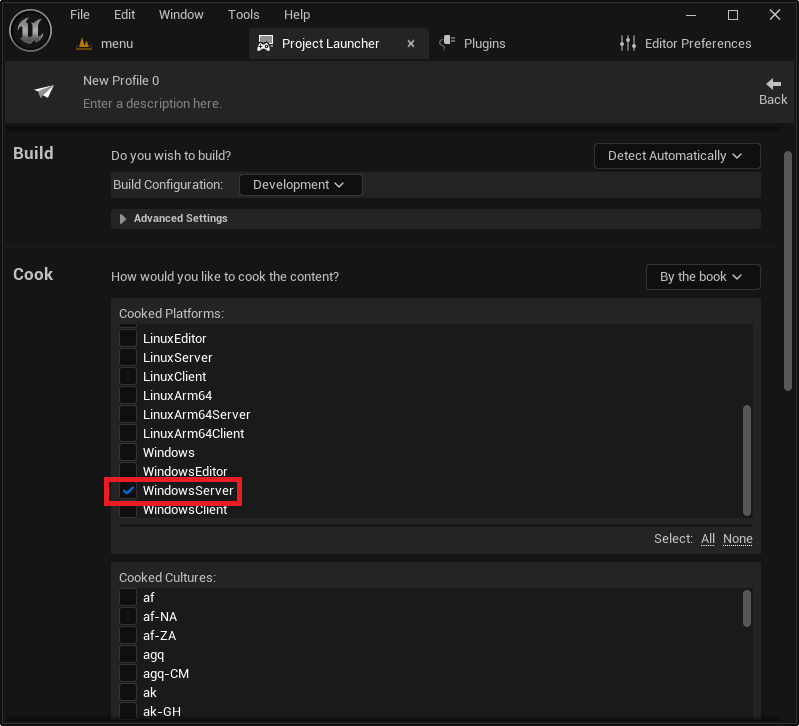
- Cook Settings: The "Cook" option must be changed from "On the fly" to "By the book." This instructs the engine to pre-cook all necessary content into platform-specific packages, which is crucial for a standalone server build and ensures optimal performance and resource loading.
- Cooked Platforms: Developers must specify the target server platform. For Windows-based hosting, "WindowsServer" is selected. Options like "LinuxServer" (for x86/64 Linux) or "LinuxArm64" (for ARM-based Linux servers) are available for cross-platform deployments, offering flexibility based on the chosen hosting environment. This choice determines the architecture of the compiled server executable.
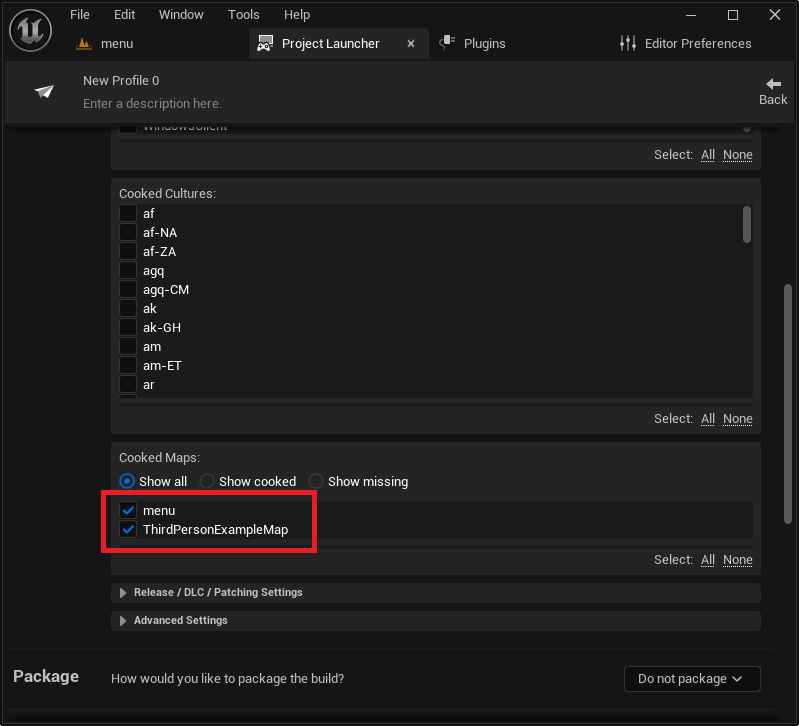
- Maps to Cook: All maps intended for use on the server, including the default server map and any subsequent game levels, must be explicitly added to this list. Failure to include a map will result in the server being unable to load it during gameplay.
- Package Settings: The "Package" option is set to "Package & store locally." This directs the Project Launcher to compile and package all game assets and server binaries into a designated local directory. The output path can be customized, allowing developers to organize their build artifacts effectively.
- Deploy Settings: For local testing or manual deployment, the "Deploy" option is changed to "Do not deploy." This prevents the Project Launcher from attempting to automatically copy the build to a specific device, giving developers control over how and where the server files are managed.
- Profile Naming: Finally, the custom profile is given a descriptive name (e.g., "MyGame Dedicated Server") for easy identification and management within the Project Launcher.
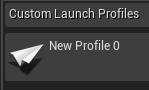
Once the custom profile is meticulously configured, initiating the build process is as simple as clicking the "Launch" button (represented by a controller and display icon) next to the newly created profile in the Project Launcher’s main menu. The engine will then commence the compilation and packaging tasks, which can take a significant amount of time, especially during the initial build, as it processes all game assets and server-specific code. Monitoring the progress and debug logging within the Project Launcher window is advisable to ensure a successful build.
Testing and Validation: Bringing the Server to Life
After the dedicated server build completes successfully, the next critical step is to test its functionality locally. The compiled server executable will be located in the specified output directory, typically [YourProjectFolder]/Saved/StagedBuilds/[PlatformName], for example, Saved/StagedBuilds/WindowsServer. Within this folder, developers will find the server executable (e.g., MyGameServer.exe).
Running the server directly might open it as a background process, making it difficult to monitor or terminate. To facilitate debugging and real-time feedback, a simple but effective technique is employed:
- Create a Shortcut: Right-click the server executable and create a desktop shortcut.
- Add Log Argument: Right-click the newly created shortcut, open its properties, and in the "Target" field, append the command-line argument
-logto the end of the executable path. This argument forces the server to open a console window, displaying all internal logging messages, including session creation, client connections, and any errors, providing invaluable insights into its operation.
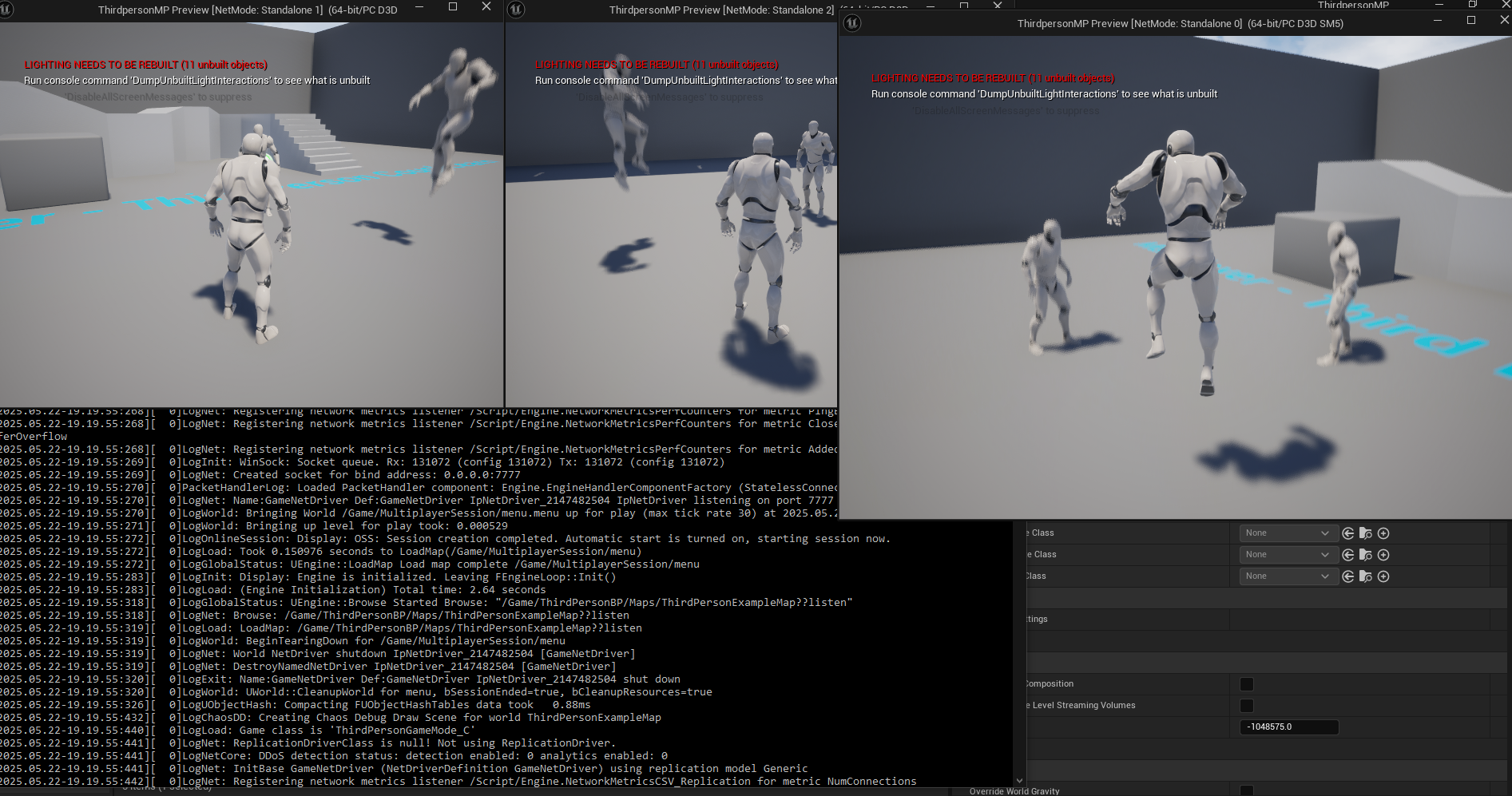
Upon launching the shortcut, the console window will fill with text, indicating the server’s initialization process. This output confirms that the server is setting up the game world, creating a session, and preparing to accept client connections. Once the server is fully operational, clients (either multiple instances of the game running in the editor or separate packaged client builds) can then attempt to connect to the session.
The client’s session browser should now display the newly created dedicated server session, allowing players to join. This local testing phase is crucial for verifying network connectivity, session management, and overall game logic on the server before considering broader deployment. A successful demonstration involves multiple clients connecting to the dedicated server, observing synchronized player movement and interactions, and confirming that the server, not a player’s machine, is authoritatively managing the game state. This setup provides a robust foundation for scaling multiplayer experiences without relying on a full client to host the game, thereby eliminating host advantage and improving overall game integrity.
Broader Implications and Future Horizons
The successful implementation of a dedicated server in Unreal Engine 5 extends far beyond local testing; it opens doors to advanced deployment strategies and significantly impacts the game’s long-term viability.

Cloud Hosting and Scalability: The logical next step after local validation is deploying the dedicated server to a cloud hosting provider such as Amazon Web Services (AWS), Google Cloud Platform (GCP), or Microsoft Azure. These platforms offer elastic scalability, allowing developers to dynamically provision server instances based on real-time player demand. This approach ensures that the game can handle sudden surges in player count without performance degradation, offering a global footprint and low latency for players across different regions. Cloud infrastructure also facilitates automated patching, monitoring, and robust security measures.
Advanced Server Architecture: For larger titles, the dedicated server setup is often integrated into a more complex backend architecture. This can include matchmaking services to connect players to appropriate game sessions, persistent world servers for MMOs, and robust analytics systems to monitor server performance and player behavior. Containerization technologies like Docker and orchestration platforms like Kubernetes are increasingly used to manage server deployments, enabling faster scaling, easier updates, and more resilient infrastructure.
Impact on Player Experience and Monetization: A well-implemented dedicated server architecture directly translates to a superior player experience. Reduced latency, minimized cheating, and consistent uptime foster a fair, enjoyable, and reliable environment. This, in turn, contributes to higher player retention rates, stronger community engagement, and can positively impact monetization strategies, as players are more likely to invest time and money in a game they trust and enjoy. Industry data consistently shows that games with robust online infrastructure command higher player loyalty and have longer lifespans.
Conclusion
The development and deployment of a dedicated server for an Unreal Engine 5 game represent a critical investment in the quality and longevity of any multiplayer title. From preparing the project with a source build and essential plugins to meticulously configuring custom build profiles in the Project Launcher and rigorously testing the output, each step is designed to forge a powerful and reliable online experience. This technical foundation not only enhances performance, security, and reliability compared to traditional peer-to-peer hosting but also empowers developers to create ambitious, scalable multiplayer worlds that can captivate and retain players globally. By embracing dedicated server architecture, Unreal Engine 5 developers are well-positioned to meet the evolving demands of the modern gaming landscape, delivering consistent, high-quality gameplay that stands the test of time.
About the Author








