
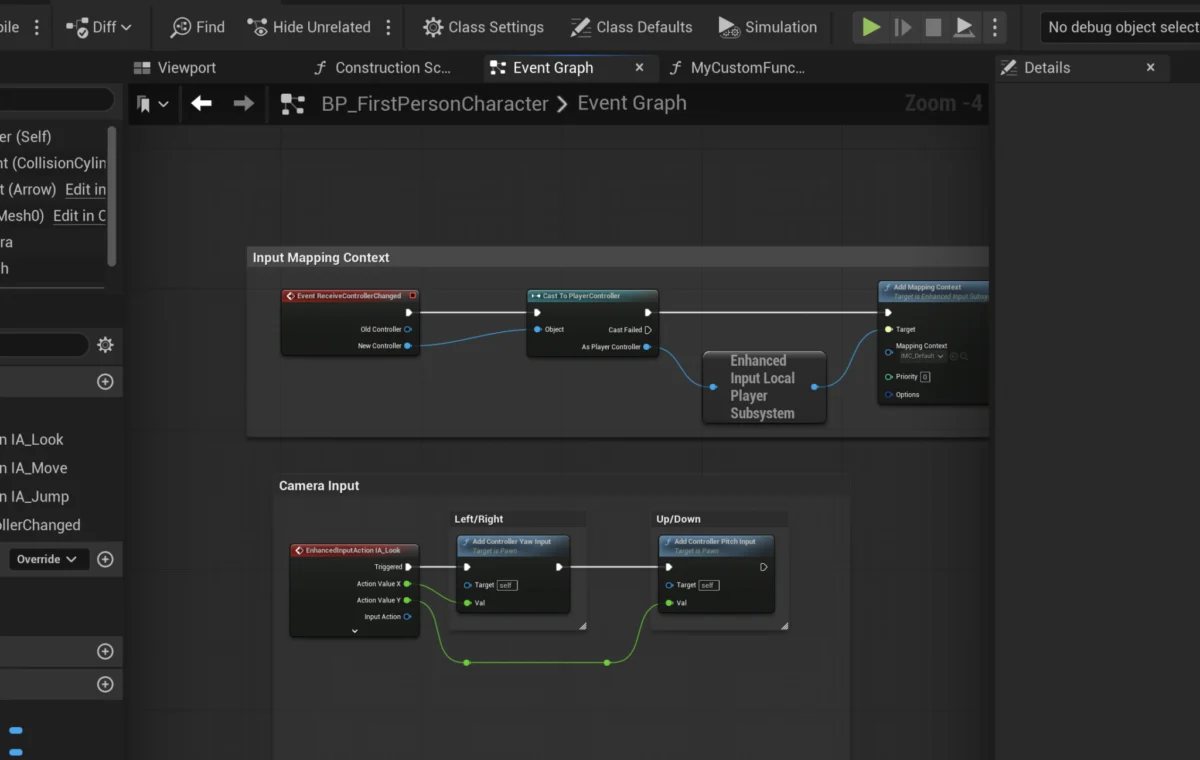
The landscape of modern game development is continually shaped by advancements in engine capabilities, and Unreal Engine 5 (UE5) stands at the forefront, offering powerful tools designed to streamline complex processes. Among its most pivotal features are Blueprint Functions, self-contained units of logic that serve as the bedrock for efficient, modular, and reusable code within the visual scripting environment. This guide delves into the foundational role of Blueprint Functions, illustrating their creation, application, and broader implications for developers aiming to build robust and scalable interactive experiences.
The Evolution of Visual Scripting and Unreal Engine’s Blueprints
Visual scripting has emerged as a transformative paradigm in game development, democratizing access to complex programming logic and empowering a wider array of creators, from technical artists to level designers, to implement sophisticated gameplay mechanics without needing extensive C++ knowledge. Epic Games, with its pioneering Unreal Engine, has been a central proponent of this movement. The journey began with Kismet in Unreal Engine 3 (UDK), which laid the groundwork for visual scripting. However, it was the introduction of Blueprints in Unreal Engine 4 that truly solidified this approach, offering a more comprehensive, powerful, and integrated visual scripting system.
Unreal Engine 5 inherits and significantly refines this legacy, with Blueprints remaining a cornerstone of its development ecosystem. Blueprint Functions, in particular, represent a mature evolution of this system, providing a structured way to encapsulate operations, manage complexity, and foster collaboration across diverse development teams. The underlying philosophy is simple: break down intricate systems into manageable, reusable components, thereby accelerating iteration cycles and improving project maintainability.
Understanding the Core: What is a Function?
In programming, a function is a block of organized, reusable code that performs a single, specific task. Functions are designed to be "self-contained," meaning they can be executed from various points within a program without needing to rewrite their internal logic each time. This concept is fundamental to all programming paradigms, from traditional text-based languages like C++ or Python to visual scripting environments like Unreal Engine’s Blueprints.
Blueprint Functions are the visual scripting equivalent, manifesting as self-contained graphs of interconnected nodes that execute a predefined sequence of operations. Their primary advantage lies in their ability to accept "input parameters," process these inputs through their internal logic, and then provide "output parameters" as results. This input-process-output model is critical for creating flexible and adaptable systems.
Consider a common scenario in game development: calculating damage. Without functions, a developer might implement the same damage calculation logic (e.g., subtracting armor from raw damage, applying elemental resistances, checking for critical hits) every time damage is dealt – from a player attack, an enemy spell, or an environmental hazard. This leads to redundant code, which is prone to errors, difficult to update, and a nightmare to debug. Blueprint Functions offer an elegant solution. By creating a single CalculateDamage function, developers can encapsulate all this complex logic in one place. Any changes or updates to the damage formula only need to be applied within this single function, instantly propagating across all instances where it is called, drastically reducing development time and potential bugs. This modularity is not merely a convenience; it is a critical engineering practice that underpins scalable and maintainable game projects.
Crafting Blueprint Functions: A Step-by-Step Overview
The process of creating and implementing Blueprint Functions in Unreal Engine 5 is designed to be intuitive, even for those new to visual scripting. We can illustrate this by walking through the creation of a simple function and then expanding it into a more practical application, such as the CalculateDamage example.
1. Initial Function Creation:
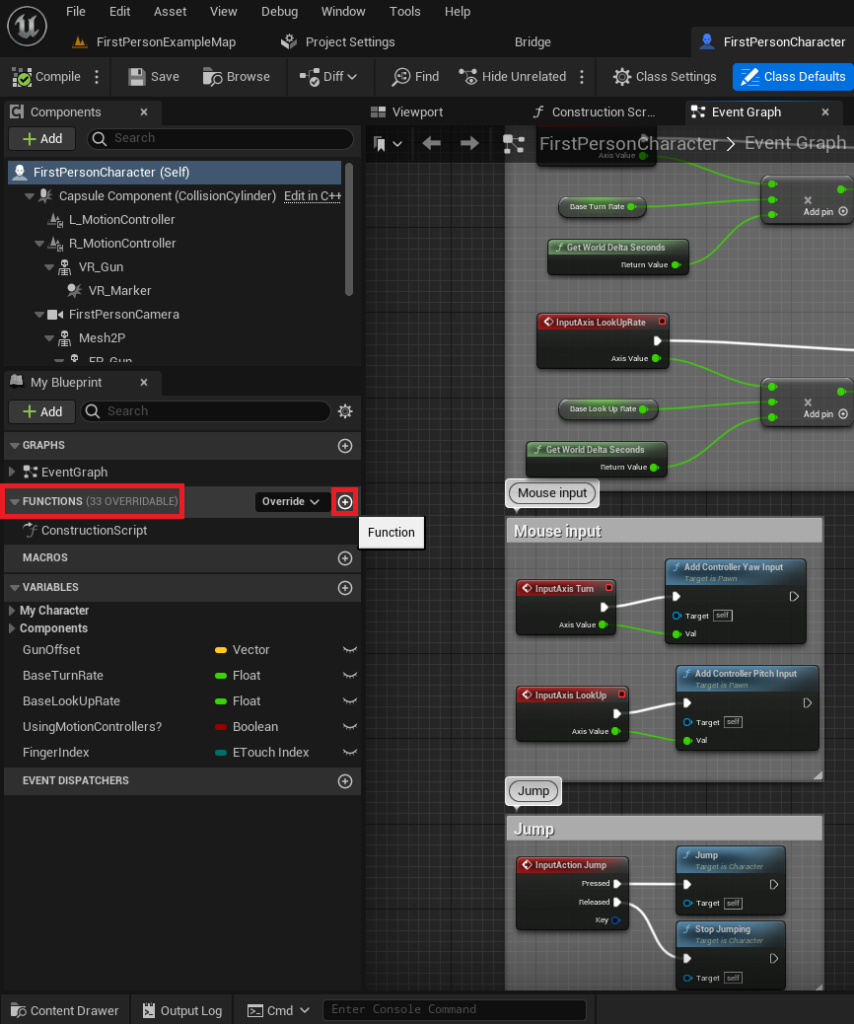
To begin, a developer must open the Blueprint actor where the function will reside. For instance, in a First-Person Shooter template, this might be the FirstPersonCharacter Blueprint. Within the Blueprint Editor, a dedicated "Functions" section is prominently displayed on the left-hand side. By clicking the "+" icon next to this section, a new function can be added.
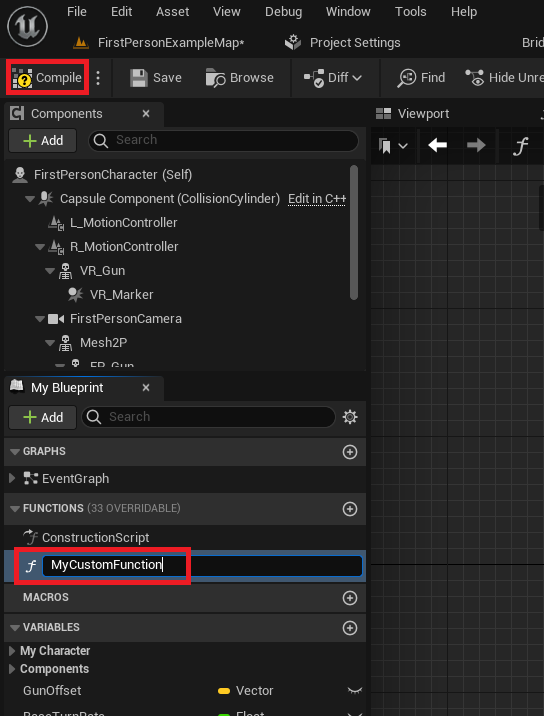
- Best Practice for Naming: One of the most critical steps, often overlooked, is giving the function a clear, descriptive name. Ambiguous or inconsistent naming conventions can quickly lead to a cluttered and confusing project, especially in large-scale developments involving multiple team members. A name like
CalculateDamageimmediately conveys its purpose, whereasMyCustomFunction(used in the tutorial as a placeholder) would be less useful in a production environment. After naming, compiling the Blueprint integrates the new function, making it ready for internal logic definition.
2. Implementing Basic Functionality: The "Print String" Example:
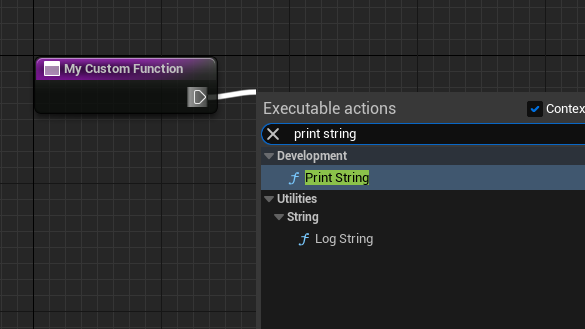
Upon creation, a new function is an empty canvas. To add logic, nodes are connected sequentially using "exec pins" (the white sideways triangles). Dragging from an exec pin and releasing the mouse button opens a context-sensitive menu, allowing developers to search for and add various Blueprint nodes.
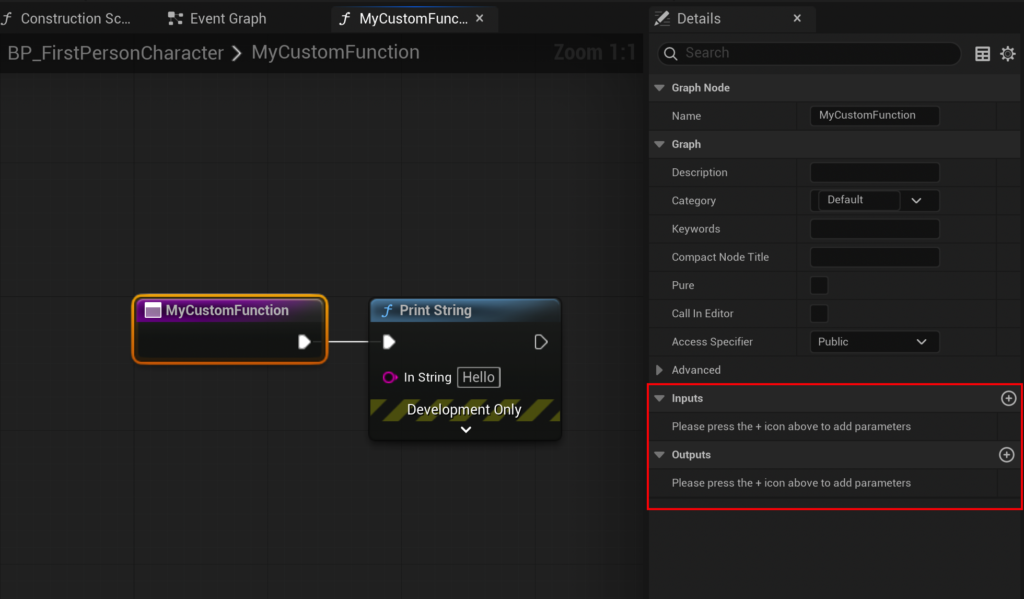
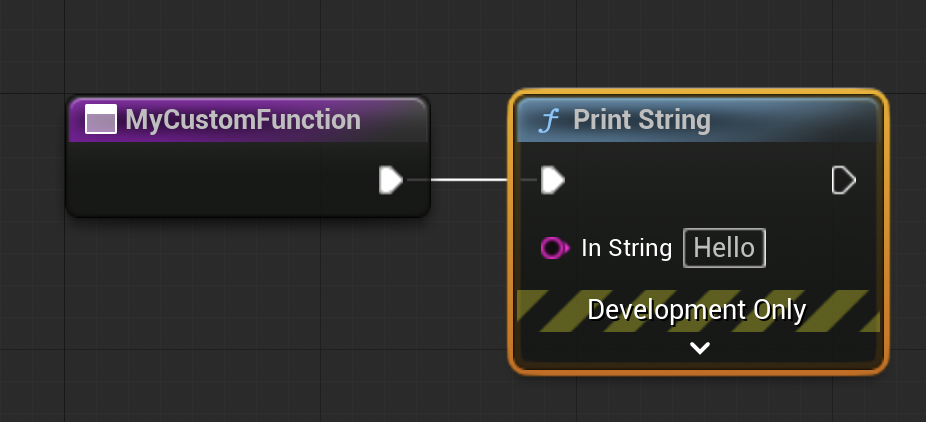
- Demonstration: A simple
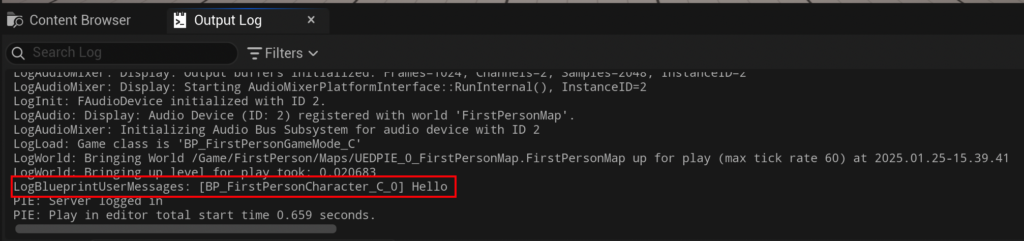
Print Stringnode is often the first step in testing a new function. Connecting the function’s entry exec pin to aPrint Stringnode means that whenever the function is "called" or "run," it will execute thePrint Stringoperation, typically displaying text in the game’s output log. This fundamental connection illustrates the flow of execution within Blueprints.
3. Integrating Functions with Events: The "Begin Play" Event:
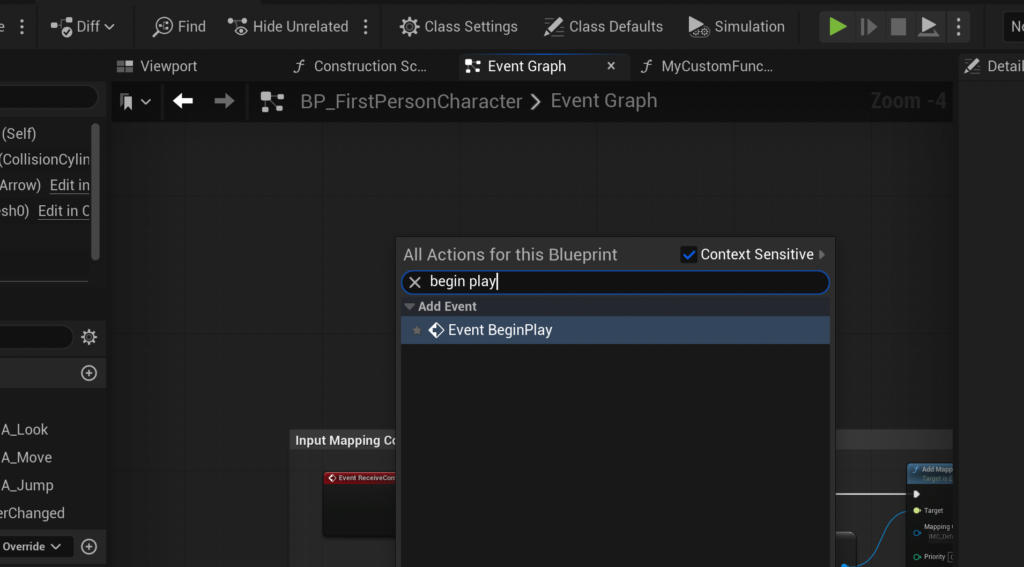
For a function to execute, it must be triggered by an "event." Events are special nodes that represent occurrences within the game world (e.g., the game starting, a character taking damage, a button being pressed). Unlike functions, events typically do not return values and can handle certain asynchronous operations (like delays) that functions cannot directly.
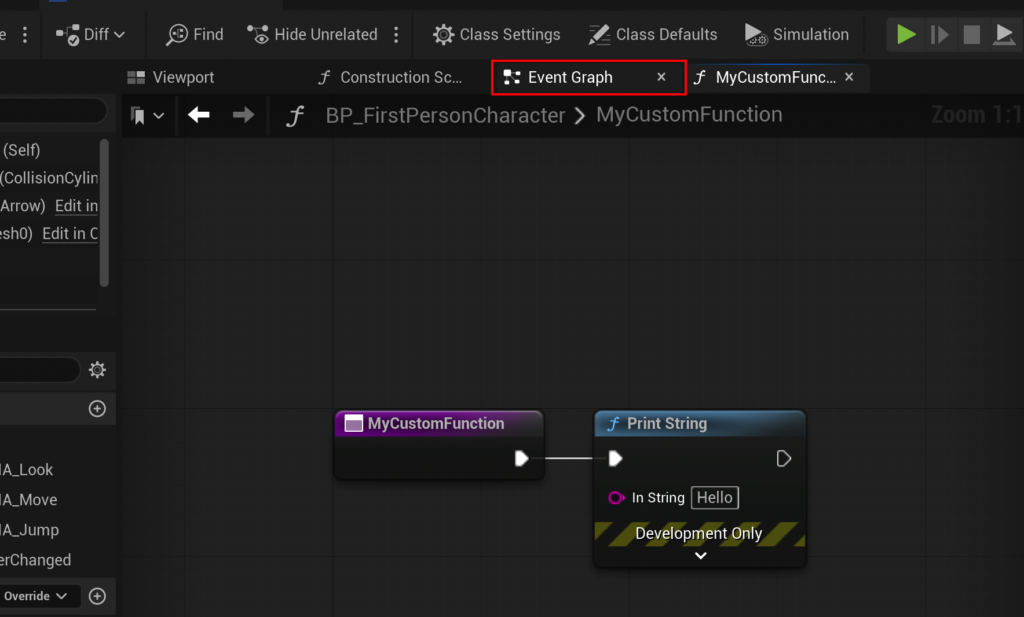
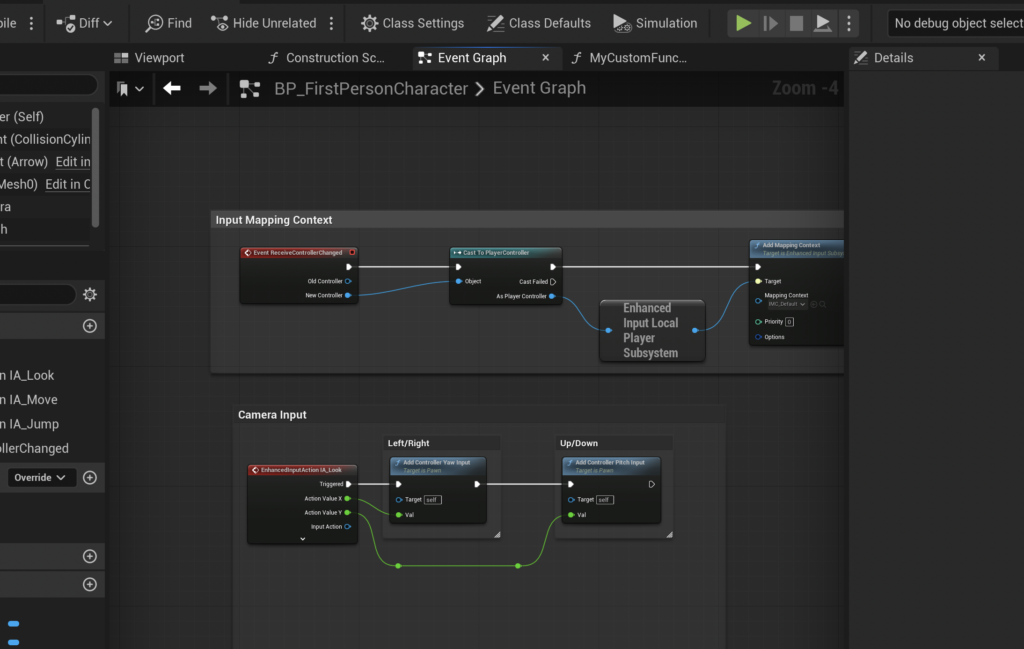
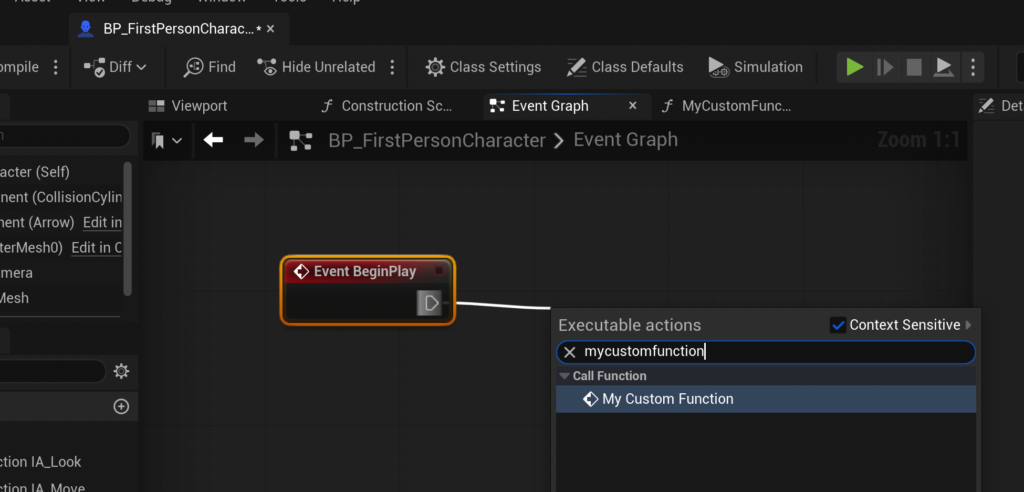
- Event Graph: To connect a function to an event, developers navigate to the Blueprint’s "Event Graph." Here, an
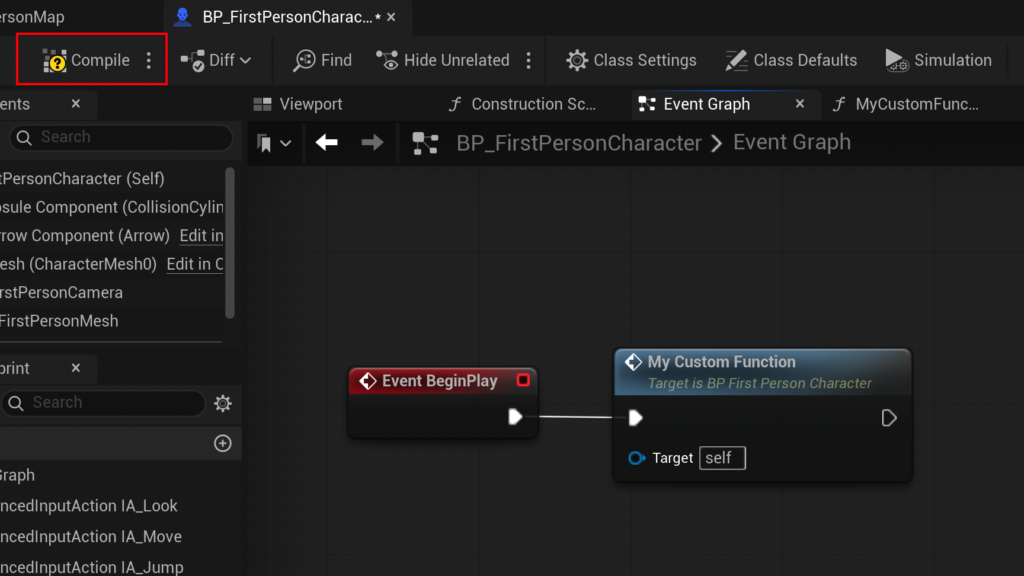
Event Begin Playnode can be created. This event fires automatically when the associated actor is spawned into the game world. By dragging an exec pin fromEvent Begin Playand searching for the newly created function (e.g.,MyCustomFunction), a "call node" for that function is created and linked. Upon compiling and running the game, theEvent Begin Playtriggers the function, which then executes its internalPrint Stringnode. This simple workflow confirms the function’s operational status.
4. Advanced Functionality: Input, Variables, and Output Parameters for CalculateDamage:
To move beyond basic operations, functions need to handle dynamic data. This is where input and output parameters become crucial.

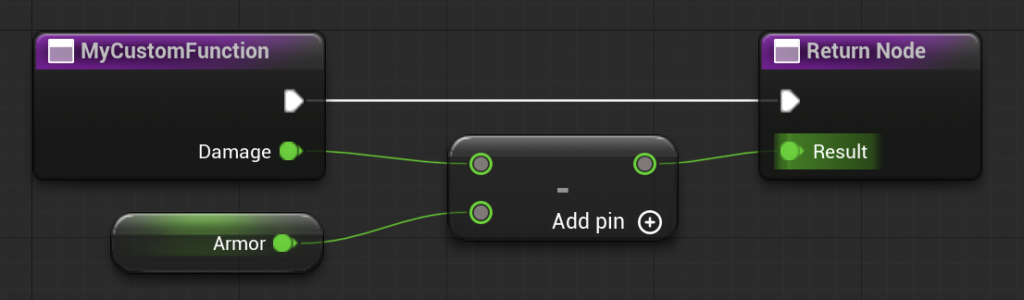
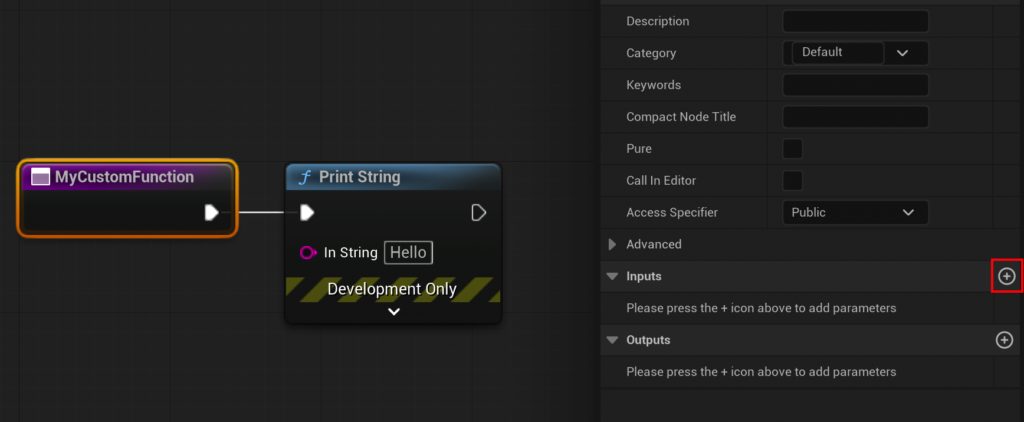
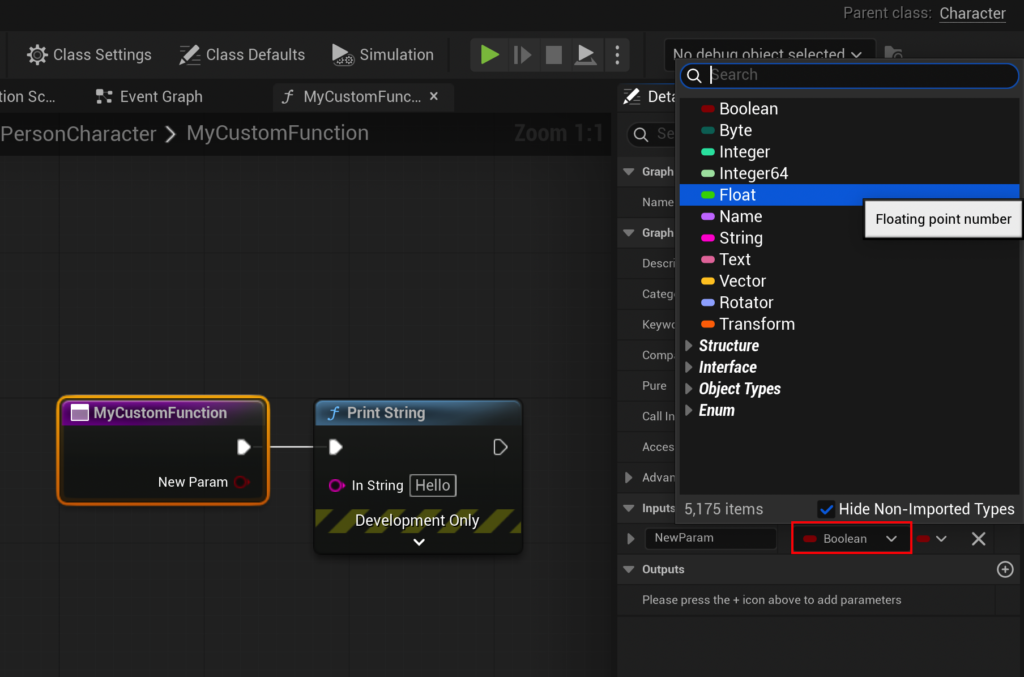
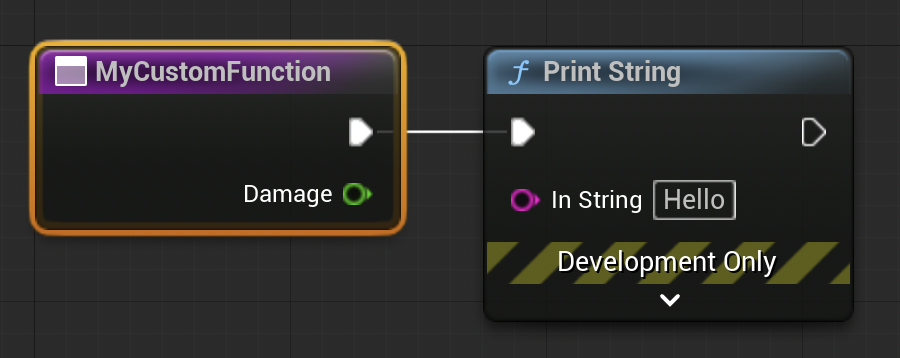
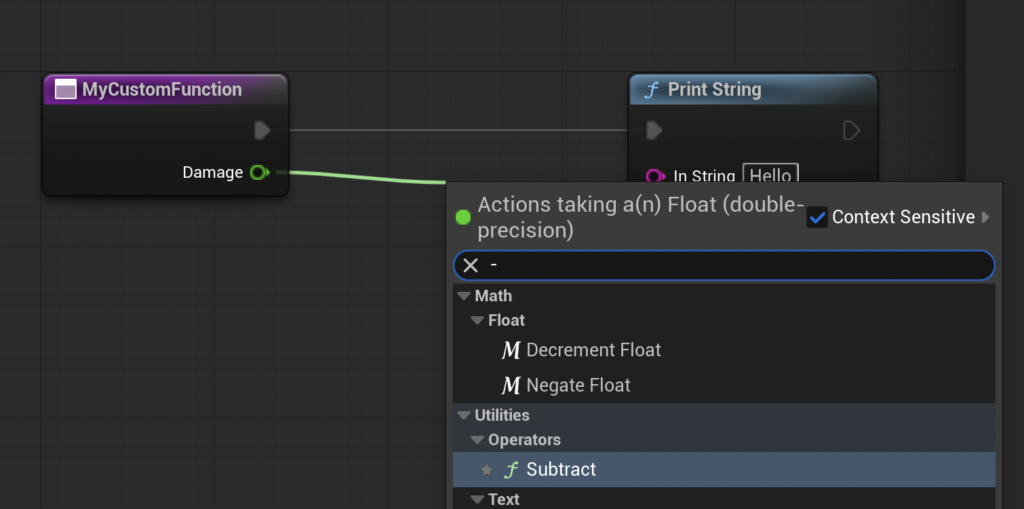
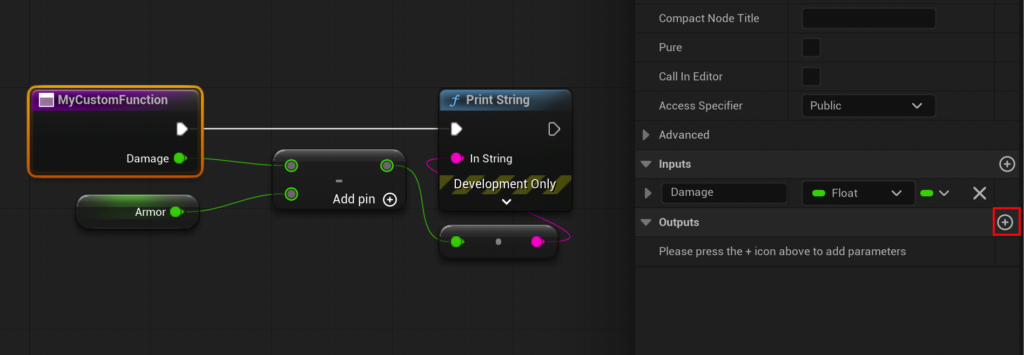
- Input Parameters: By selecting the function’s entry node within its graph, the "Details" panel on the right reveals "Input" and "Output" sections. Clicking the "+" icon under "Input" allows developers to define new input variables. For our
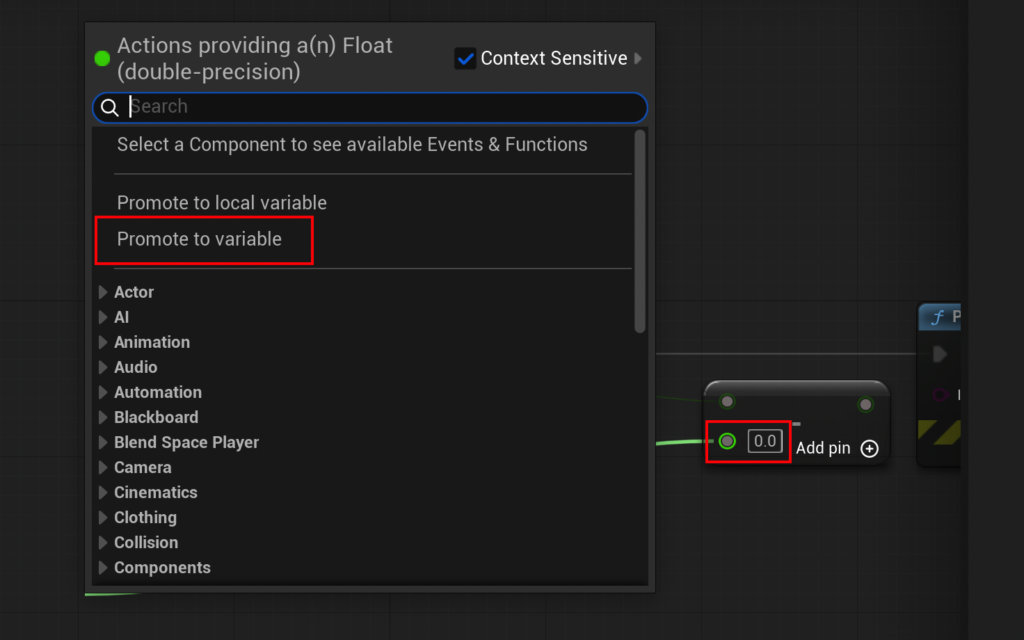
CalculateDamagefunction, a "Damage" input parameter of type "Float" (for decimal numbers) would be added. This parameter appears as a pin on the function’s call node in the Event Graph, allowing developers to pass specific damage values when calling the function. - Internal Logic with Variables: Within the function, the "Damage" input can be connected to other nodes. To simulate armor, a
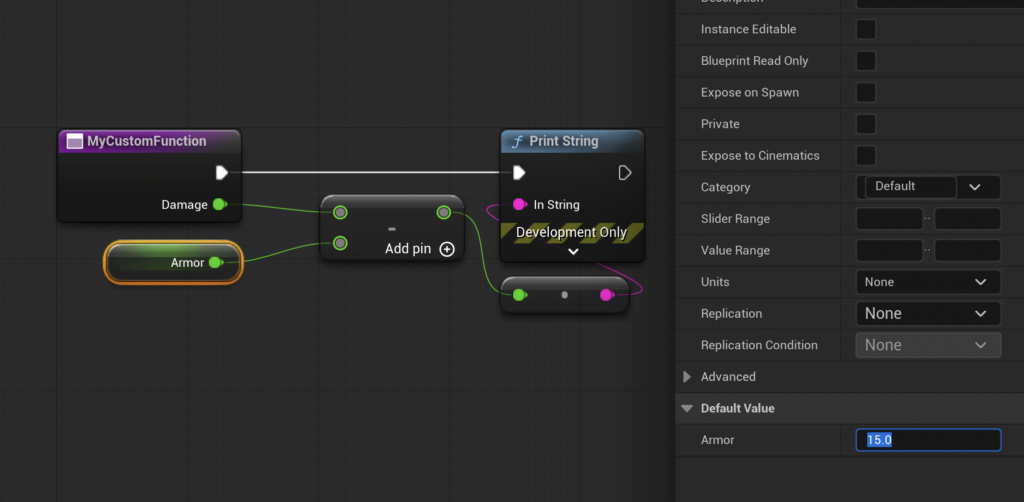
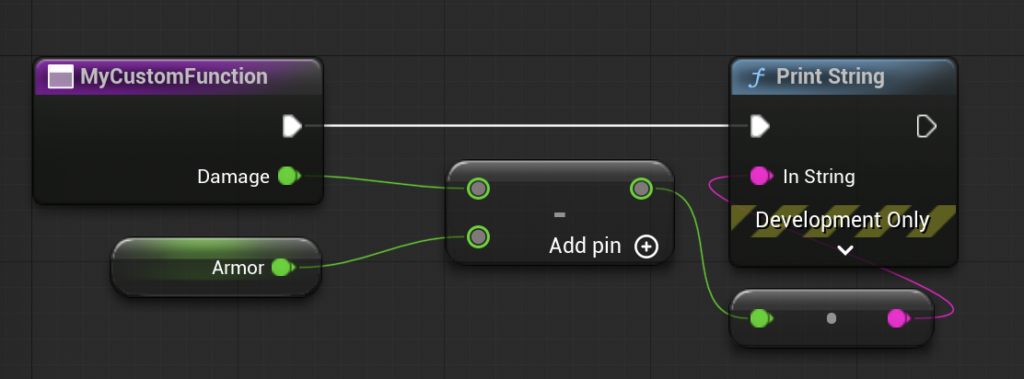
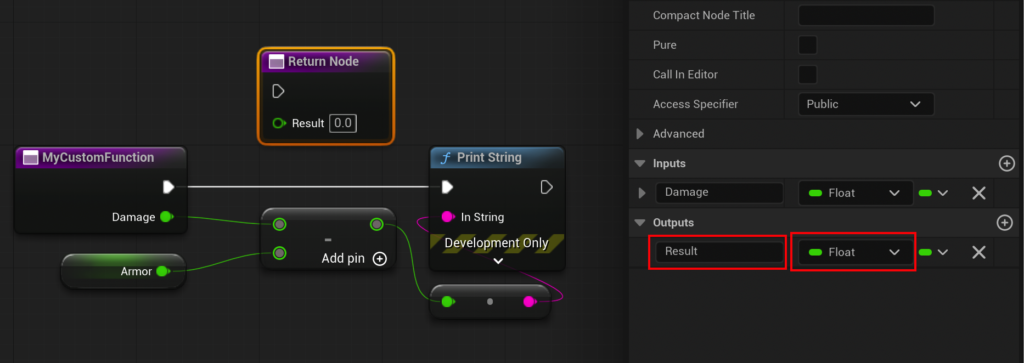
Subtractnode is used. The second operand of this subtraction can be "promoted to a variable," creating a new internal variable named "Armor" (also a Float). ThisArmorvariable can then be given a default value (e.g., 15) in its details panel. The result ofDamage - Armoris the calculated effective damage. - Output Parameters (Return Values): Just as a function takes input, it often needs to provide an output. Similar to input parameters, an "Output" parameter (e.g., "Result," also a Float) is added via the function’s details panel. This action automatically generates a "Return Node" within the function graph. The result of the
Subtractoperation is then connected to theResultpin of this Return Node. Now, when theCalculateDamagefunction is called in the Event Graph, it will have a "Result" output pin, providing the computed damage value. - Testing the Advanced Function: In the Event Graph, the
CalculateDamagefunction call node now accepts a "Damage" input and provides a "Result" output. By setting the inputDamageto, say, 20.0, and connecting theResultoutput to anotherPrint Stringnode, the system will output5(20 – 15 = 5) to the log, confirming the function’s accurate calculation.
Limitations and Alternatives: The Case of Asynchronous Operations
While Blueprint Functions are incredibly versatile, they do have a notable limitation: they are designed for synchronous execution and cannot directly support asynchronous nodes like Delay or other time-based operations. This is by design, ensuring that functions execute predictably and provide immediate results. For scenarios requiring pauses or asynchronous workflows, Unreal Engine offers "Custom Events." These are similar to functions but allow for the inclusion of Delay nodes and other latent actions, making them suitable for state-based logic or timed sequences. Understanding this distinction is crucial for effective Blueprint architecture, enabling developers to choose the right tool for the job.
Supporting Data and Industry Impact
The strategic use of Blueprint Functions yields substantial benefits across the game development lifecycle:
- Reduced Development Time: By centralizing logic, functions drastically cut down on repetitive work. A feature that might take hours to implement across multiple Blueprints can be managed and updated in minutes within a single function.
- Enhanced Maintainability: Debugging becomes significantly easier. If a bug is found in the damage calculation, a developer knows exactly where to look: within the
CalculateDamagefunction. This prevents "bug sprawl" where issues propagate across disparate, duplicated code blocks. - Improved Collaboration: Functions serve as clear interfaces for team members. A programmer can create a complex function, and a designer can use it by simply dragging and dropping the function call node, providing inputs, and utilizing outputs, without needing to understand the intricate internal workings. This fosters a more efficient division of labor.
- Scalability for Large Projects: As games grow in complexity, the number of Blueprints can become overwhelming. Functions help organize this complexity, preventing "spaghetti code" and ensuring that even massive projects remain manageable and performant.
Epic Games’ commitment to empowering developers through tools like Blueprint Functions is evident in the engine’s widespread adoption. Unreal Engine is utilized by a vast array of studios, from small indie teams to AAA giants, and the robustness of its visual scripting system is a frequently cited advantage. Surveys among Unreal Engine developers consistently highlight Blueprints as a key factor in their choice of engine, with modularity features like functions being central to their workflow efficiency.
Official Responses and Broader Implications
Epic Games has consistently advocated for accessibility and efficiency in game creation. The design philosophy behind Blueprint Functions aligns perfectly with this mission, enabling iterative development and rapid prototyping. While there are no specific official statements directly on "Blueprint Functions" as a singular event, the continuous investment in and refinement of the Blueprint system—including its functional components—reflects Epic’s strategic vision. Community feedback channels, forums, and developer conferences frequently feature discussions where functions are praised for their role in structuring game logic and simplifying complex systems.
The broader implications extend beyond mere convenience:

- Democratization of Game Development: Functions lower the barrier to entry for individuals with strong logical thinking but limited traditional programming experience, expanding the pool of potential game creators.
- Focus on Design: With core logic encapsulated, designers can focus more on gameplay mechanics and user experience, iterating rapidly without being bogged down by implementation details.
- Future-Proofing Projects: Well-architected functions make projects more adaptable to future changes and expansions, an essential consideration in the long development cycles of modern games.
- Performance Considerations: While Blueprints are generally slower than native C++ code, well-structured Blueprints with efficient functions can be optimized. Epic Games continually works on improving Blueprint compilation and execution performance, ensuring that this visual scripting approach remains viable for demanding applications.
Conclusion
Blueprint Functions in Unreal Engine 5 are far more than just a convenience; they are an indispensable tool for modern game development. By offering a powerful mechanism for encapsulating, reusing, and organizing logic, they significantly enhance workflow efficiency, improve code maintainability, and foster seamless collaboration among development teams. From the simplest Print String to complex CalculateDamage routines, functions provide the architectural backbone for building scalable and robust interactive experiences. As Unreal Engine continues to evolve, the strategic mastery of Blueprint Functions will remain a fundamental skill for any developer aiming to craft compelling and efficient games in this cutting-edge engine.
About the Author








