Unreal Engine 5 (UE5) leverages sophisticated tools to streamline the game development process, and among the most valuable for managing structured information are Data Tables. These powerful assets provide a robust mechanism for programmers and designers to create, store, and access pre-defined lists of data, fundamentally improving workflow, design iteration, and project scalability. Unlike hardcoded values or disparate asset files, Data Tables centralize information into a coherent, easily manageable format, crucial for complex game systems.
The Core Functionality of Data Tables
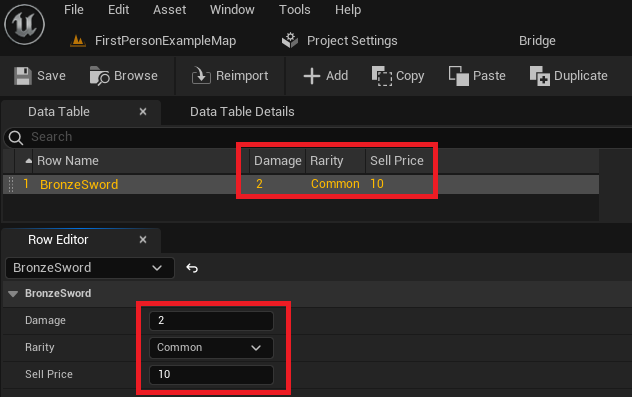
At its heart, a Data Table in Unreal Engine 5 is a structured collection of data, akin to a spreadsheet, where information is organized into rows and columns. Each row typically represents a unique entry, identified by a distinct "Row Name" (acting as a key), while columns define the specific data types and properties associated with each entry. The fundamental principle is that every row adheres to a pre-defined structure, known as a USTRUCT. This USTRUCT acts as a blueprint, dictating the exact types of values—integers, floats, strings, booleans, or even other custom structures and enumerations—that each row in the Data Table will hold.
This data is stored as a native asset within the Unreal Engine project, making it exceptionally straightforward to retrieve and update from any part of the game’s code, whether in C++ or Blueprint visual scripting. A significant advantage is its persistence within the editor; developers can populate and modify data during development, and these values are remembered and available at runtime. This persistence is invaluable for systems requiring extensive configuration, such as defining characteristics for a multitude of in-game items, enemies, character abilities, or environmental parameters. For instance, instead of creating individual blueprint assets for every sword variant or enemy type, a single Data Table can hold all relevant statistics, rarities, and properties, which are then dynamically loaded and applied to generic item or enemy blueprints.
The ease of creation and implementation is a hallmark of Data Tables in UE5, requiring minimal overhead to establish a robust data management system. The process involves a few sequential steps: defining data types with enumerations and structures, creating the Data Table itself, populating it with entries, and finally, integrating it into the game logic for runtime access.
Establishing the Data Schema: Enums and Structs
Before a Data Table can be instantiated, its underlying data structure must be explicitly defined. This is where Enumerations and Structures come into play, serving as the foundational schema for the data entries.
Creating an Enumeration (Enum)
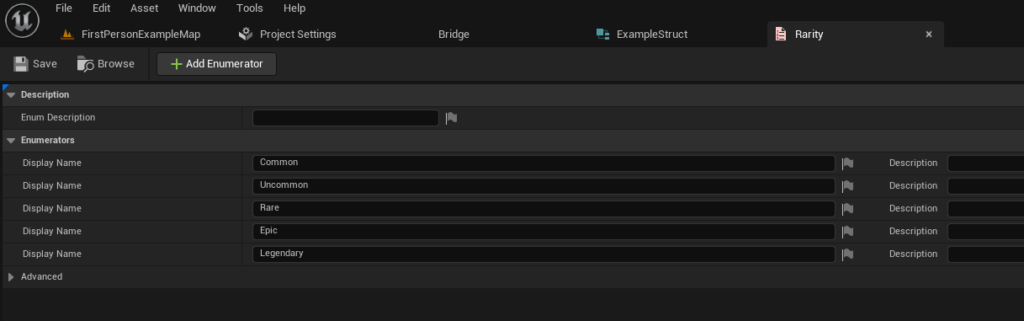
An Enum (short for enumeration) is a user-defined data type that consists of a set of named integer constants. In game development, enums are frequently used to represent a finite list of distinct states or qualities. For example, in a role-playing game, item quality or rarity might be categorized as "Common," "Uncommon," "Rare," "Epic," or "Legendary." Using an enum for this purpose ensures data consistency, prevents typographical errors, and makes the code more readable and maintainable compared to using raw strings or integers.
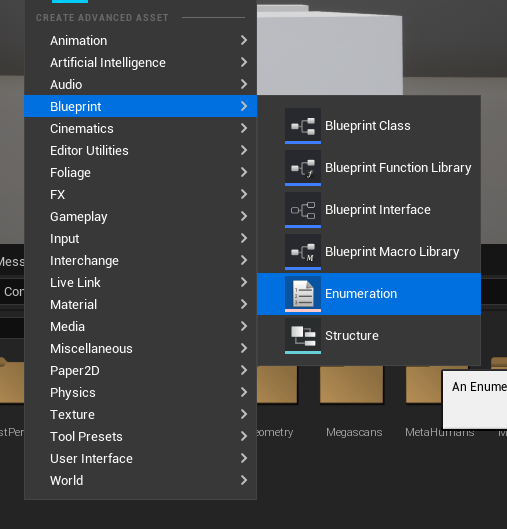
To create an enum in Unreal Engine, a developer navigates to the Content Browser, right-clicks, and selects "Enumeration" under the Blueprint category. Once created, descriptive names such as "EItemRarity" are typically assigned, and specific values corresponding to the desired categories (e.g., "Common," "Uncommon," "Rare") are defined. Each value is assigned an internal integer index, which the engine uses for reference. This step is critical for providing a controlled vocabulary for certain data fields within the Data Table.
Defining the Data Structure (Struct)
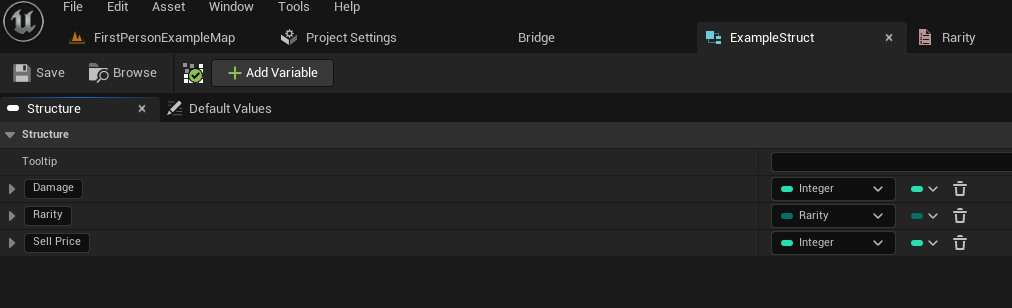
The Structure (USTRUCT in Unreal Engine) is the backbone of a Data Table. It acts as a custom data type that groups together a collection of variables of different types under a single name. For a Data Table, the struct defines the "columns" – the specific properties that each "row" or entry will possess. For instance, an FItemData struct might contain variables for Damage (float), Rarity (an enum type like EItemRarity), and SellPrice (integer).
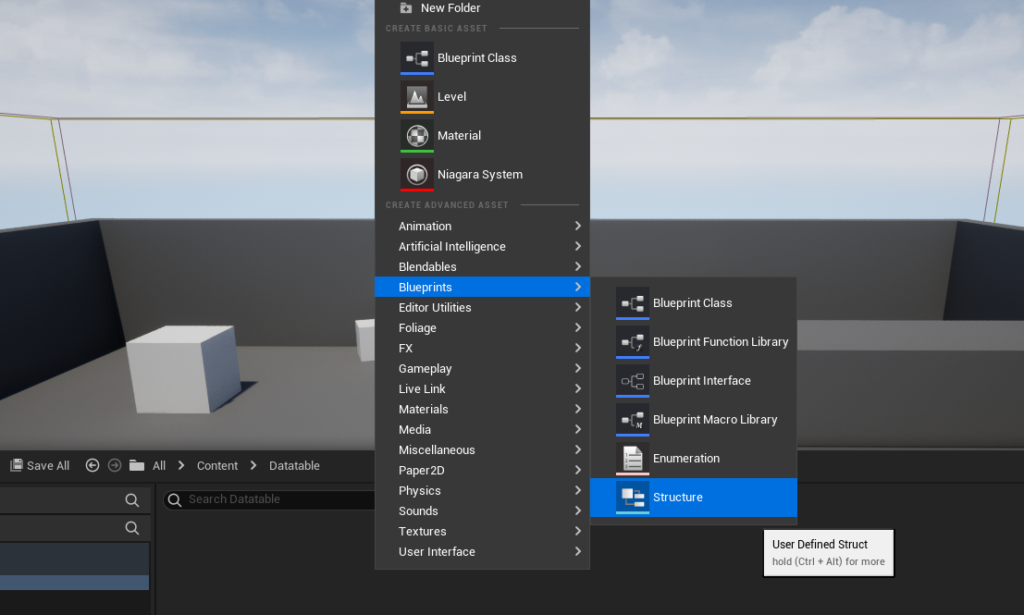
The creation of a struct follows a similar path to an enum: right-clicking in the Content Browser and selecting "Structure" within the Blueprints category. After naming the struct (e.g., "FExampleItemData"), the developer adds variables (members) corresponding to each desired data field. Each variable is assigned a type, which can include primitive types (integers, floats, booleans, strings), other custom structs, or the custom enum created previously. For an FExampleItemData struct, one might add a Float variable named Damage, an EItemRarity variable named Rarity, and an Integer variable named SellPrice. This design ensures that every entry in the subsequent Data Table will uniformly contain these three pieces of information, maintaining a consistent data schema.
Constructing the Data Table Asset
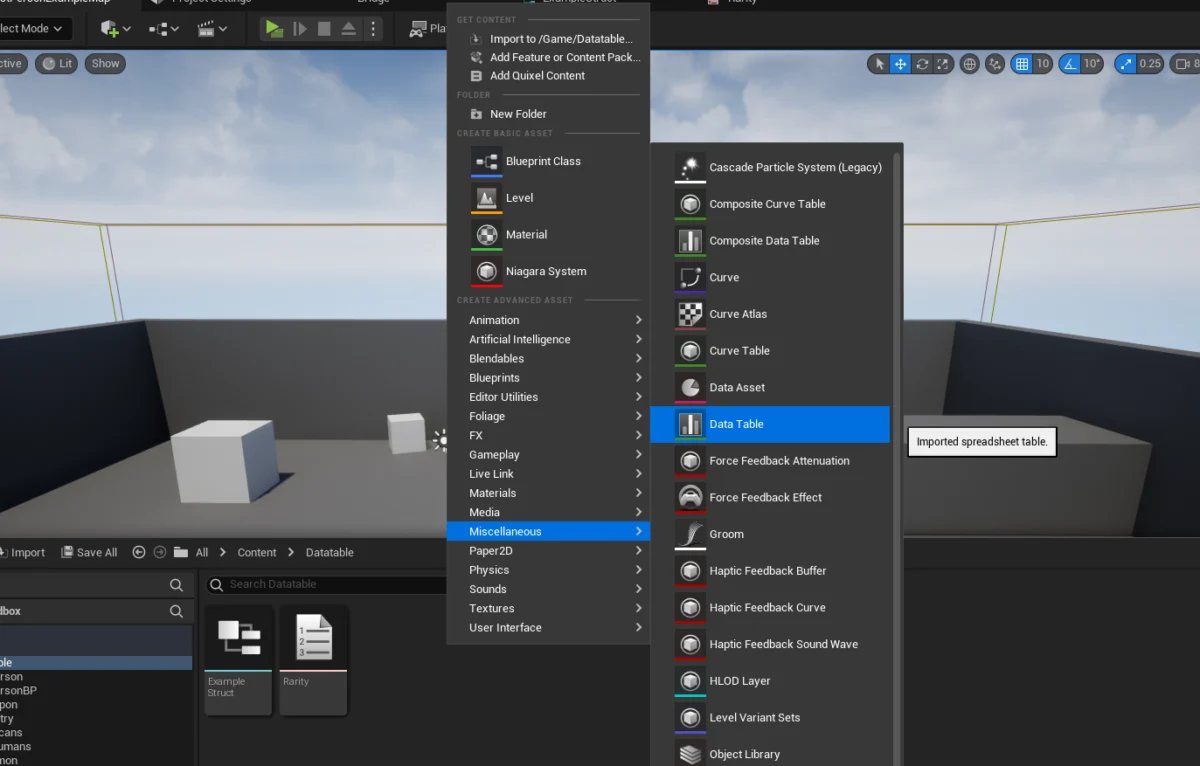
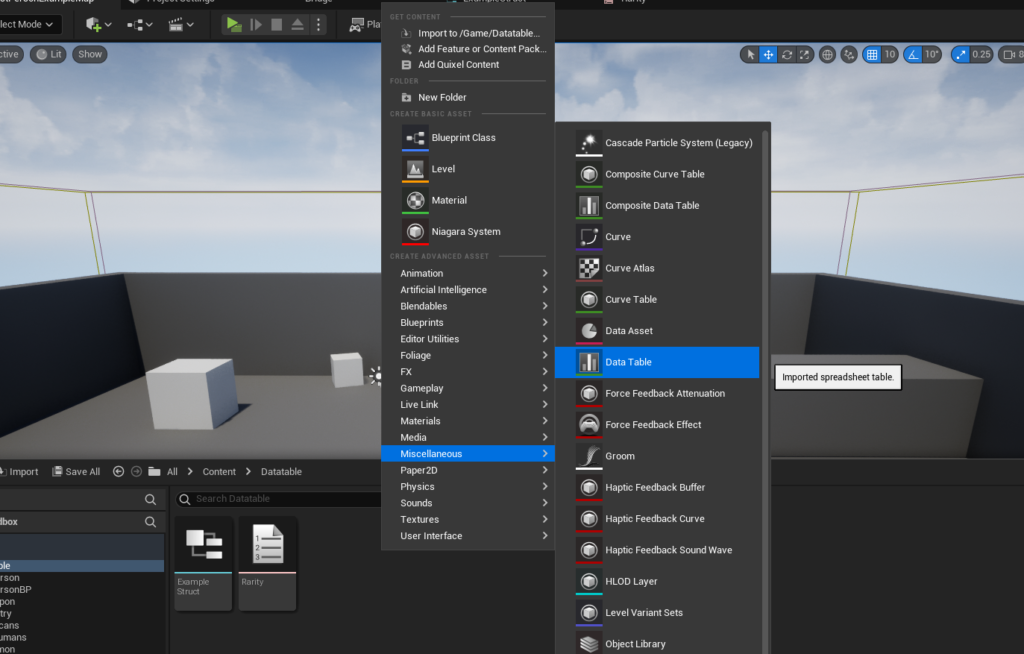
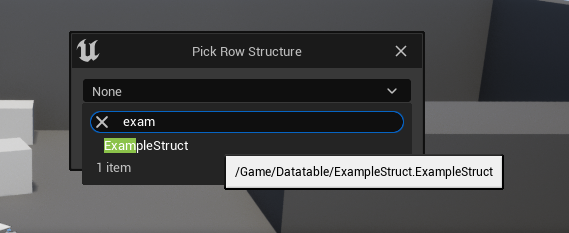
With the foundational enum and struct in place, the actual Data Table asset can be created. This is performed by right-clicking in the Content Browser, navigating to the "Miscellaneous" category, and selecting "Data Table." Upon selection, the engine prompts the developer to choose the USTRUCT that will serve as the template for the Data Table’s rows. This is a crucial step as it binds the Data Table to its schema, ensuring all entries conform to the defined structure (e.g., FExampleItemData).
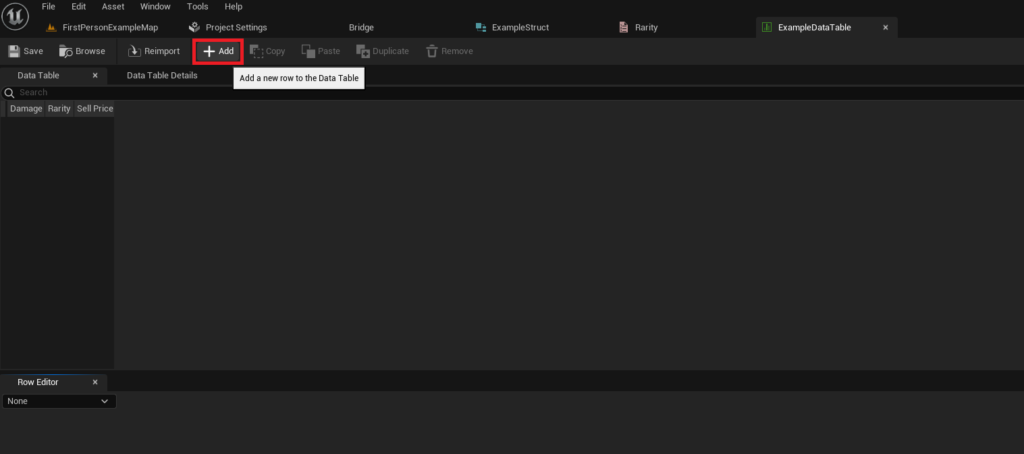
Once the appropriate struct is chosen, the Data Table asset is generated. Opening this asset reveals a spreadsheet-like interface within the Unreal Editor. This interface allows designers and developers to directly input and manage the game data.
Populating and Managing Data Table Entries
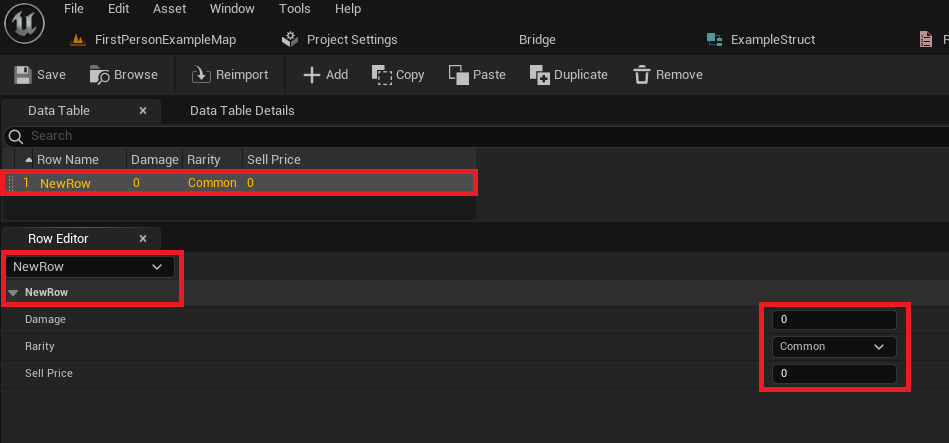
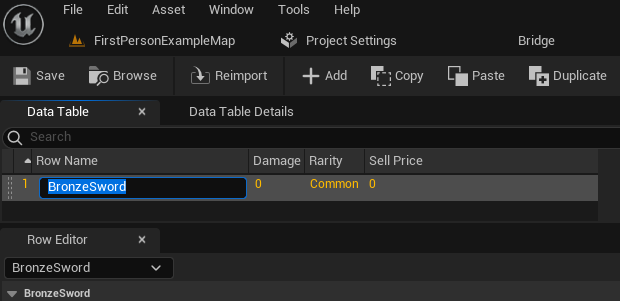
The newly created Data Table initially appears empty. To add data, the developer uses an "Add" button, which inserts a new row into the table. Each new row automatically populates with default values based on the properties defined in the chosen USTRUCT.
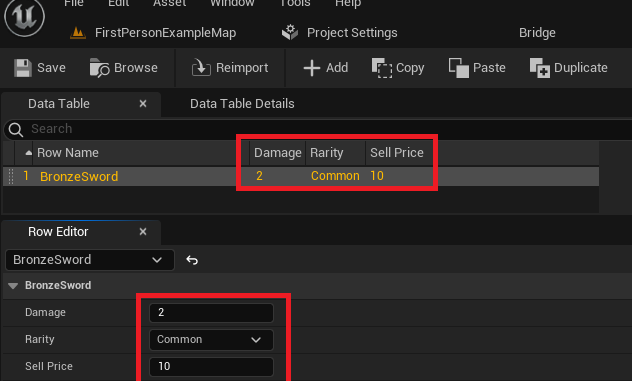
The Data Table interface typically features a "Row Editor" panel, where the individual properties of the selected row can be viewed and modified. For instance, if a row representing a "Bronze Sword" is selected, the Row Editor will display fields for "Damage," "Rarity," and "Sell Price." Changing values in the Row Editor dynamically updates the corresponding entry in the main table view. This intuitive editing process allows for rapid iteration and modification of game data without requiring any programming knowledge.
A critical aspect of Data Tables is the "Row Name." This unique identifier serves as the primary key for retrieving specific data entries. Developers can rename default row entries (e.g., "NewRow_0" to "BronzeSword") to make them descriptive and easily identifiable. It is imperative to maintain unique and meaningful Row Names for efficient data access later in the game logic. The ability to create an unlimited number of entries, each with its unique Row Name and property values, underscores the scalability and flexibility of Data Tables for managing diverse game content. Regular saving of the Data Table asset is highly recommended to prevent data loss during development.
Accessing Data Tables at Runtime
The true utility of Data Tables manifests when their stored information is accessed and utilized by the game’s logic during runtime. Unreal Engine provides straightforward methods for this, primarily through Blueprint nodes or C++ functions.
Retrieving Specific Rows
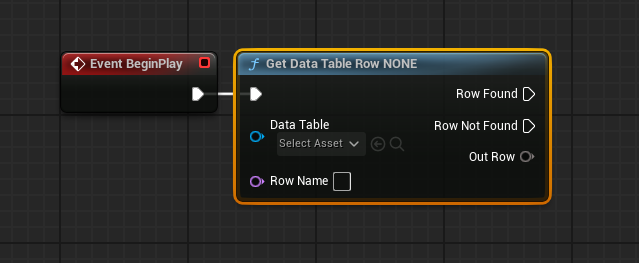
The primary method for accessing individual data entries is through the Get Data Table Row Blueprint node (or FindRow in C++). This node requires two key inputs:
- Data Table Reference: A direct reference to the Data Table asset itself. This is typically set by selecting the specific Data Table from a dropdown menu in the node’s details panel.
- Row Name: The unique string identifier (key) of the row whose data is to be retrieved. This can be manually entered or dynamically provided by other parts of the game logic.
The Get Data Table Row node offers two execution pins: "Row Found" and "Row Not Found." This provides robust error handling, allowing developers to define different behaviors based on whether the requested row exists. If the row is found, an "Out Row" output pin provides the retrieved data, packaged as an instance of the USTRUCT that defines the Data Table’s schema.
To easily access the individual properties within the "Out Row" struct, developers can right-click on the "Out Row" pin and select "Split Struct Pin." This expands the struct into its constituent variables (e.g., Damage, Rarity, Sell Price), making them directly accessible for use in subsequent Blueprint logic. This dynamic retrieval mechanism is fundamental for systems like item spawning, enemy stat generation, or UI display, where specific item data is needed on demand. For instance, when a player picks up a "Bronze Sword," the game can use its Row Name to fetch its damage, rarity, and sell price from the Data Table and apply these attributes to the item in the player’s inventory.
Iterating Through Data Table Rows
While retrieving individual rows by name is common, there are scenarios where developers need to process every entry in a Data Table. Examples include populating a shop inventory with all available items, calculating aggregate statistics, or performing data validation checks. For such cases, Unreal Engine provides mechanisms to iterate through all rows.
The Get Data Table Row Names Blueprint node is used to obtain an array containing all the "Row Names" (keys) present in a given Data Table. This array can then be fed into a For Each Loop node. The For Each Loop will execute its "Loop Body" once for each Row Name in the array, providing the current Row Name as an "Array Element" output.
Inside the loop, this "Array Element" (the current Row Name) can be connected to the "Row Name" input of a Get Data Table Row node. This setup allows the game to sequentially retrieve the full data for each row in the Data Table. The "Out Row" data from this node can then be processed as needed within the loop’s body, enabling powerful batch operations on the stored game data. For example, a shop blueprint could iterate through an "AllItems" Data Table, retrieve the name and price for each item, and dynamically create UI elements to display them to the player.
Broader Implications and Best Practices in Game Development
The strategic adoption of Data Tables extends far beyond simple data storage; it profoundly impacts development workflow, team collaboration, project scalability, and long-term maintainability.
Streamlined Design and Iteration: Data Tables empower game designers to directly modify core game values (e.g., character health, weapon damage, spell cooldowns, enemy AI parameters) without requiring a programmer to recompile code. This significantly accelerates the iteration cycle, allowing for quicker balancing and tuning of gameplay mechanics. Designers can experiment with values in a user-friendly spreadsheet format, seeing immediate results in-game.
Enhanced Collaboration: In multi-disciplinary teams, Data Tables serve as a "single source of truth" for shared game data. Level designers can reference item data, programmers can implement logic based on character stats, and content creators can define asset properties, all relying on the same centralized data asset. This minimizes communication overhead and reduces the risk of conflicting data versions, especially when integrated with version control systems like Perforce or Git.
Scalability and Performance: As games grow in complexity, managing hundreds or thousands of unique items, enemies, or spells manually becomes unsustainable. Data Tables provide a scalable solution, efficiently storing vast amounts of structured data. At runtime, accessing this data is highly optimized. The Get Data Table Row node provides direct, fast lookups by key, outperforming methods that might involve parsing external files (like JSON or XML at runtime) or iterating through large arrays of unstructured data.
Localization: Data Tables are an indispensable tool for game localization. Text strings for UI elements, dialogue, item descriptions, and quest logs can be stored in Data Tables, with different columns for each language. The game can then dynamically load the appropriate language column based on the player’s selected locale, making the localization process far more manageable and less error-prone.
Modding and User-Generated Content: For games that support modding, Data Tables can be exposed to mod creators. By defining clear data structures, modders can create their own custom items, characters, or game elements by simply adding new rows to a Data Table, leveraging the game’s existing logic without needing to modify core code.
Comparison with Alternative Data Storage: While JSON, XML, or custom binary files can also store data, Data Tables offer unique advantages within Unreal Engine:
- Native Integration: They are first-class assets in the Unreal Editor, offering visual editing tools and seamless integration with Blueprints and C++.
- Strong Typing: Enforced by
USTRUCTdefinitions, ensuring data integrity and reducing runtime errors. - Performance: Optimized for direct access within the engine, unlike external file parsing which might incur overhead.
- Editor Persistence: Data is part of the project asset, not just external files, simplifying asset management.
However, Data Tables are best suited for static or semi-static data that changes infrequently after development. For highly dynamic data (e.g., player inventory that constantly changes, live service game configurations updated frequently from a server), a dedicated database solution or server-side API might be more appropriate.
Conclusion
Unreal Engine 5 Data Tables are a cornerstone of efficient and scalable game development. By providing a structured, centralized, and easily accessible method for managing diverse game data, they empower development teams to build more complex, maintainable, and iteratively refined experiences. From defining item properties and character statistics to managing localization strings and enabling modding, Data Tables significantly enhance productivity and ensure data consistency across the entire project lifecycle. Mastering their creation, configuration, population, and runtime implementation is an essential skill for any developer aiming to leverage the full power of Unreal Engine 5 in modern game production.
About the Author