Blender, the acclaimed open-source 3D creation suite, continues to empower artists and developers with its ever-expanding arsenal of powerful tools. While many users are well-acquainted with the software’s core functionalities, a significant number of its advanced modeling features remain underutilized, often due to a lack of awareness. This oversight can lead to increased production times and a less efficient workflow, particularly when tackling complex geometric designs and intricate details. To address this knowledge gap, a recent tutorial by digital artist Stanisław has shed light on several invaluable, yet often overlooked, modeling utilities integrated within Blender, specifically highlighting the capabilities of the free "Edit Mesh Tools" add-on.
The tutorial, which has garnered significant attention within the Blender community, aims to demystify these powerful functions and demonstrate their practical application in real-world 3D modeling scenarios. Stanisław, an experienced Blender user, emphasizes that even seasoned professionals can benefit from exploring these lesser-known features, which can dramatically streamline the creative process. The core of the tutorial focuses on five key tools that collectively offer enhanced control and efficiency in mesh manipulation.
Unveiling the Power of Underutilized Edit Mesh Tools
The "Edit Mesh Tools" add-on, readily available and free to all Blender users, provides a suite of specialized operators designed to refine and enhance the modeling workflow. Stanisław’s presentation meticulously breaks down the utility of each selected tool, offering clear visual demonstrations and practical examples.
1. Offset Edges: Precision Border Creation
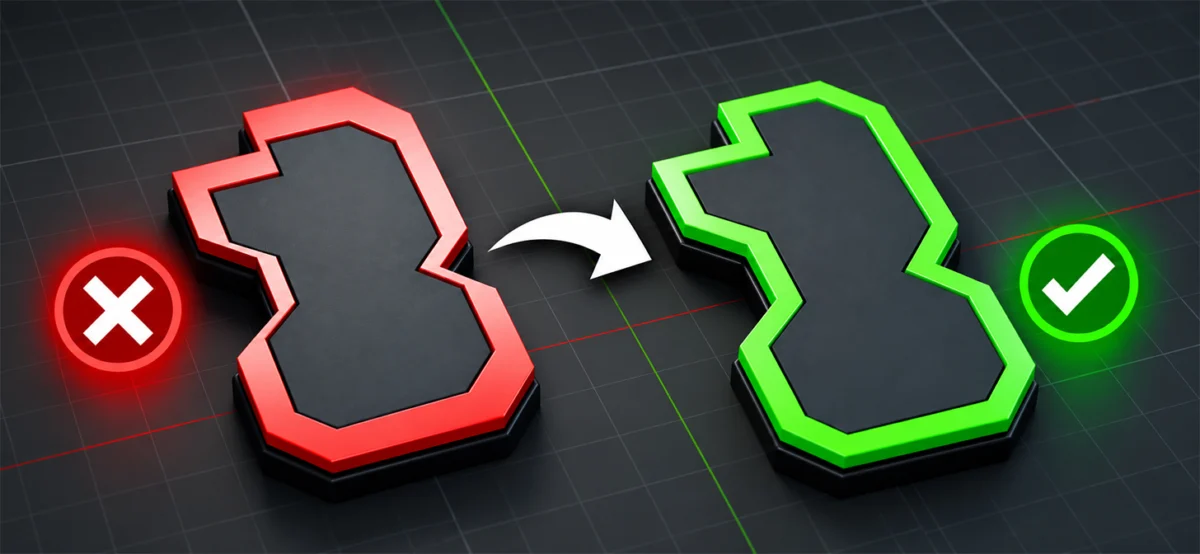
One of the standout tools highlighted is "Offset Edges." Stanisław describes it as a personal favorite, contrasting its functionality with the standard scaling operations available in Blender. Unlike scaling, which uniformly alters the size of geometry, Offset Edges allows for the creation of consistent borders and outlines around existing edges, irrespective of the shape’s complexity or irregularity. This capability is paramount for designers seeking to add beveled frames, subtle panel lines, or decorative trims without the tedious process of manual edge manipulation. The tool ensures that the offset distance remains uniform, maintaining aesthetic integrity even on organic or highly detailed surfaces. This is particularly beneficial in architectural visualization, product design, and character modeling where clean, precise detailing is crucial. For instance, creating the intricate borders of a custom-made furniture piece or adding the distinctive paneling on a sci-fi vehicle can be significantly accelerated with this tool.
2. Face Inset Fillet: Smoother, Organic Insets
The "Face Inset Fillet" tool offers a sophisticated alternative to Blender’s standard "Inset Faces" function. While the latter creates a uniform offset, the "Face Inset Fillet" introduces rounded corners to these insets. This feature is invaluable for generating smoother, more aesthetically pleasing transitions, which are often required for organic shapes, mechanical components, or decorative elements. The ability to control the fillet radius provides artists with granular control over the curvature, enabling the creation of subtly rounded recesses or pronounced, flowing indentations. This tool can transform basic geometric shapes into more visually engaging and realistic models, whether it’s for designing ergonomic grips on a product, adding soft edges to character armor, or crafting decorative accents in interior design.
3. Multi Extrude: Streamlining Repetitive Geometry
"Multi Extrude" addresses a common bottleneck in modeling: the repetitive task of extruding individual faces. This tool empowers users to perform multiple extrusions simultaneously, offering enhanced control over the scale and rotation of each extruded element. This is a game-changer for creating complex patterns, intricate structures, or any geometry that involves repeating forms. Imagine designing a honeycomb structure, a series of evenly spaced fins on a heat sink, or a decorative lattice; "Multi Extrude" can achieve these in a fraction of the time it would take to extrude each component manually. The added control over scale and rotation allows for variations within the pattern, adding depth and realism to the final design. This efficiency boost is particularly relevant for game development, where the creation of detailed assets needs to be rapid and optimized.
4. Split Solidify: Efficient Panel Creation
The "Split Solidify" tool is designed to simplify the process of creating distinct, thickened panels from selected faces. This is a highly practical function for modeling objects that are composed of separate, layered components, such as mechanical assemblies, futuristic armor, or even certain types of architectural cladding. Instead of manually duplicating faces, assigning thickness, and then separating them, "Split Solidify" automates this workflow. It effectively extrudes and separates selected faces into individual mesh objects, each with its own defined thickness. This not only saves considerable time but also ensures consistency and accuracy in the panel construction, making it ideal for intricate mechanical designs where precise separation and thickness are critical.
5. Vertex Chamfer and Fillet Edges: Advanced Profile Modification
The tutorial also touches upon "Vertex Chamfer" and "Fillet Edges," tools that provide advanced methods for modifying corners and edges. While Blender offers standard beveling, these specialized tools allow for more nuanced control over edge profiles. "Vertex Chamfer" can create beveled edges originating from a single vertex, offering unique ways to break sharp corners. "Fillet Edges" provides further control over the curvature of edges, enabling the creation of more complex and interesting cross-sections. These tools are crucial for adding subtle details that contribute significantly to the realism and visual appeal of a model, moving beyond basic chamfers to create more organic or industrially precise finishes. They allow artists to refine the silhouette and surface transitions of their models with greater artistic freedom.
Context and Community Reaction
The release of Stanisław’s tutorial comes at a time when the Blender community is experiencing unprecedented growth, with the software’s user base expanding across various industries, including animation, game development, visual effects, and architectural visualization. According to recent reports from industry analytics firms, Blender’s market share in the open-source 3D software sector has seen a significant upward trajectory over the past five years, driven by its continuous development, robust feature set, and the absence of licensing fees. This surge in adoption naturally leads to a greater demand for efficient workflows and advanced techniques.
Stanisław’s initiative to highlight these specific tools is timely. Many artists, particularly those transitioning from other 3D software packages or those who are newer to Blender, often rely on tutorials that cover the most commonly used features. This leaves a wealth of advanced, time-saving tools like those in the "Edit Mesh Tools" add-on, largely undiscovered. The tutorial serves as a crucial resource for unlocking a deeper level of proficiency within the software.
The reaction from the Blender community has been overwhelmingly positive. On platforms like YouTube and Reddit, where the tutorial has been widely shared, users have expressed surprise and gratitude for the insights provided. Comments frequently include statements such as, "I’ve been using Blender for years and never knew about Offset Edges!" or "This Multi Extrude tool is a lifesaver for my current project." This indicates a clear demand for such content that delves into the more specialized aspects of Blender’s functionality. Many users have also shared their own "underrated" tool discoveries, further enriching the communal knowledge base.
Implications for 3D Production Workflows
The broader implication of Stanisław’s tutorial and the increased awareness of these advanced tools lies in the potential for significant improvements in 3D production workflows.
Efficiency Gains: By leveraging tools like "Multi Extrude" and "Split Solidify," artists can drastically reduce the time spent on repetitive modeling tasks. This reclaimed time can be reinvested in other critical areas of the production pipeline, such as texturing, rigging, animation, or rendering, ultimately accelerating project completion.
Enhanced Detail and Realism: Tools like "Offset Edges," "Face Inset Fillet," and the advanced edge modification options allow for a higher level of detail and more nuanced surface treatments. This directly contributes to creating more visually compelling and realistic models, which is crucial for professional-grade projects in film, games, and product visualization.
Accessibility of Advanced Techniques: The availability of these tools within a free add-on democratizes access to sophisticated modeling techniques. Artists working with limited budgets or those in educational settings can now achieve results that were previously only attainable with more expensive commercial software or through highly complex manual processes.
Continuous Learning and Skill Development: The tutorial underscores the fact that even experienced users can benefit from continuous learning. Blender’s vast feature set means there are always new techniques and tools to discover. This encourages a culture of ongoing skill development within the community, pushing the boundaries of what is possible with the software.
Looking Ahead: The Evolving Landscape of 3D Creation
As 3D modeling continues to integrate into an ever-wider array of industries, the importance of efficient and powerful tools cannot be overstated. The open-source nature of Blender, coupled with the dedication of its community and developers, ensures that the software will continue to evolve, with new features and improvements being introduced regularly. Stanisław’s tutorial serves as a valuable reminder that exploration and experimentation are key to mastering any complex software. By delving into the less obvious corners of Blender’s toolset, artists can unlock new levels of creativity and efficiency, pushing the boundaries of digital art and design. The ongoing dialogue within the community, fueled by shared knowledge and tutorials like this, promises a future where even more artists can harness the full potential of this remarkable 3D creation suite.
About the Author