
Game developers leveraging Unreal Engine 5 frequently encounter a critical juncture in their projects where the visual scripting language, Blueprint, reaches its performance ceiling. While Blueprint offers unparalleled agility for prototyping and rapid iteration, its interpretive nature can lead to execution slowdowns in computationally intensive sections of code. This inherent limitation necessitates a strategic pivot towards C++, the engine’s foundational programming language, to unlock superior performance and access advanced functionalities not natively exposed to Blueprint. The solution, which avoids a complete project overhaul, lies in the intelligent integration of C++ Blueprint Function Libraries.
The landscape of modern game development is characterized by an intricate balance between speed of iteration and raw performance. Unreal Engine’s Blueprint system excels in the former, empowering designers and technical artists to implement complex game logic without delving into traditional code. Its node-based interface simplifies logic flows, accelerates prototyping, and lowers the barrier to entry for non-programmers. However, as projects scale in complexity and demand higher frame rates or more sophisticated real-time calculations, the overhead associated with Blueprint execution can become a significant bottleneck. This often manifests in frame rate drops, delayed responses, or an inability to process large datasets efficiently.
Conversely, C++ offers the bare-metal performance and granular control required for high-stakes operations. It allows direct interaction with the engine’s core architecture, enabling optimized algorithms, intricate data structures, and integration with external libraries. The trade-off, however, is a steeper learning curve, longer compilation times, and a more rigid development cycle. Historically, migrating performance-critical Blueprint logic to C++ often meant a substantial refactoring effort, potentially disrupting existing workflows and requiring a deep understanding of Unreal’s C++ framework. This presented a dilemma for many teams: sacrifice performance for development speed, or commit to a costly and time-consuming C++ rewrite.
The C++ Blueprint Function Library emerges as a pivotal tool that elegantly resolves this dichotomy. It is a specialized Unreal Engine class designed to bridge the gap between the speed of C++ and the accessibility of Blueprint. By encapsulating performance-intensive algorithms or unique C++ features within these libraries, developers can craft highly optimized functions in C++ and then seamlessly expose them as callable nodes within any Blueprint graph. This hybrid approach allows teams to retain the benefits of Blueprint for high-level game logic and rapid iteration, while offloading critical computations to the efficiency of C++. Industry analysts and Epic Games itself underscore the importance of this architectural pattern for building scalable and performant titles within the Unreal ecosystem, noting that it represents a best-practice for complex game development.
Prerequisites for Implementation
To successfully implement and leverage C++ Blueprint Function Libraries, developers are expected to possess a foundational understanding of C++ within the Unreal Engine 5 environment. This includes familiarity with C++ syntax, object-oriented programming concepts, and the basics of Unreal’s C++ class system. Crucially, a robust Integrated Development Environment (IDE) is essential for compiling C++ code. Popular choices include Microsoft Visual Studio on Windows, Xcode on macOS, and JetBrains Rider across multiple platforms. If a developer attempts to create a C++ class without a compatible IDE installed, Unreal Engine 5 will typically prompt them to install one, streamlining the initial setup process. For instance, developers on macOS would typically install Xcode to handle the compilation of C++ source files.
Establishing a C++ Enabled Project
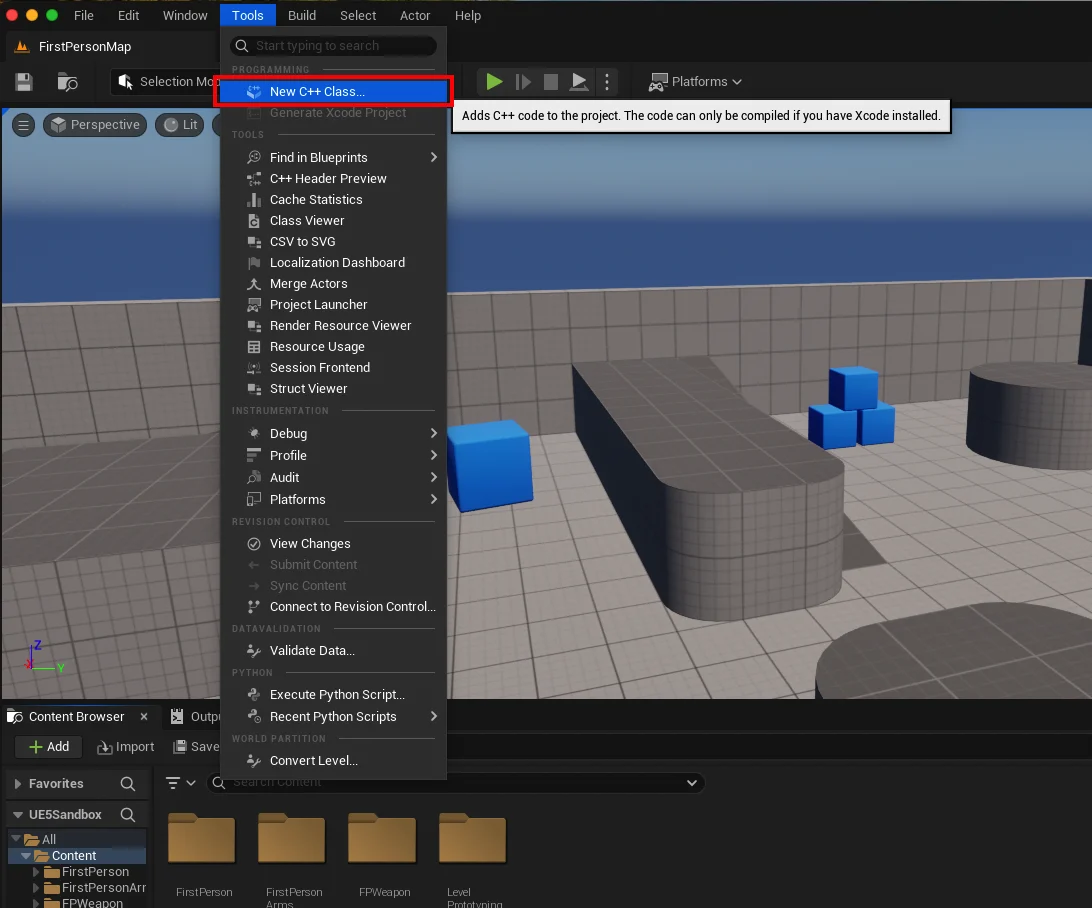
The initial step in integrating a C++ Blueprint Function Library is to ensure the Unreal Engine project is C++ enabled. Projects can originate as purely Blueprint-based, requiring an explicit conversion or addition of C++ capabilities. This process is straightforward: from the Unreal Editor’s main interface, navigate to the "Tools" dropdown menu and select "New C++ Class." If the project is not already C++ enabled, this action will initiate the necessary configurations, including the generation of project files and the prompt to install an IDE if one is missing. This conversion is a one-time setup that unlocks the full potential of C++ integration.
Creating the Blueprint Function Library Class
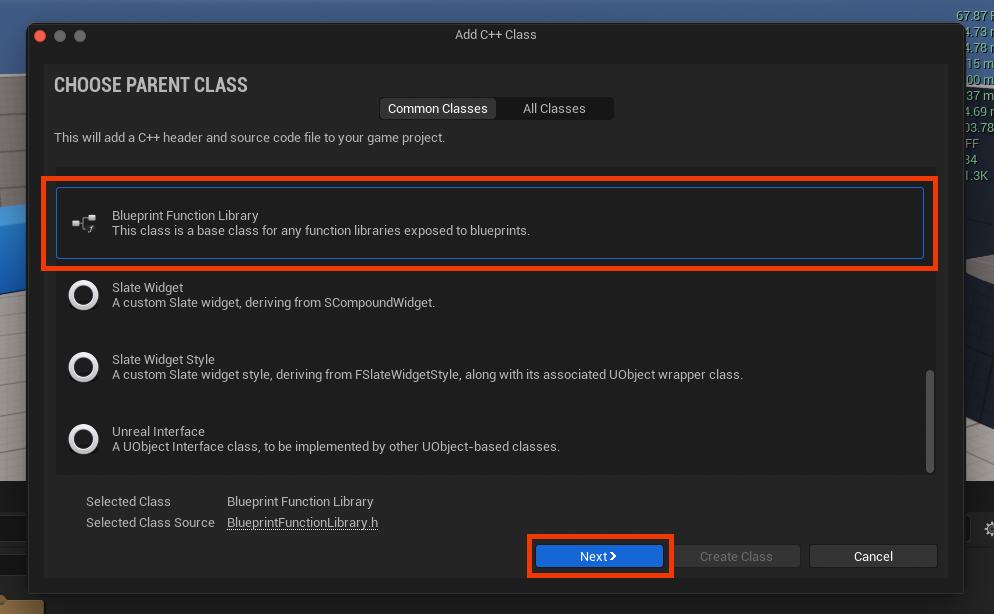
Once the project is C++ enabled, the creation of the function library proceeds within the "New C++ Class" dialog. Developers are presented with a selection of "Parent Classes," which determine the fundamental characteristics and inheritance of the new C++ class. For a Blueprint Function Library, the appropriate choice is, predictably, "Blueprint Function Library," typically found near the bottom of the extensive list. Selecting this option and proceeding to the next step guides the developer to name their new class.
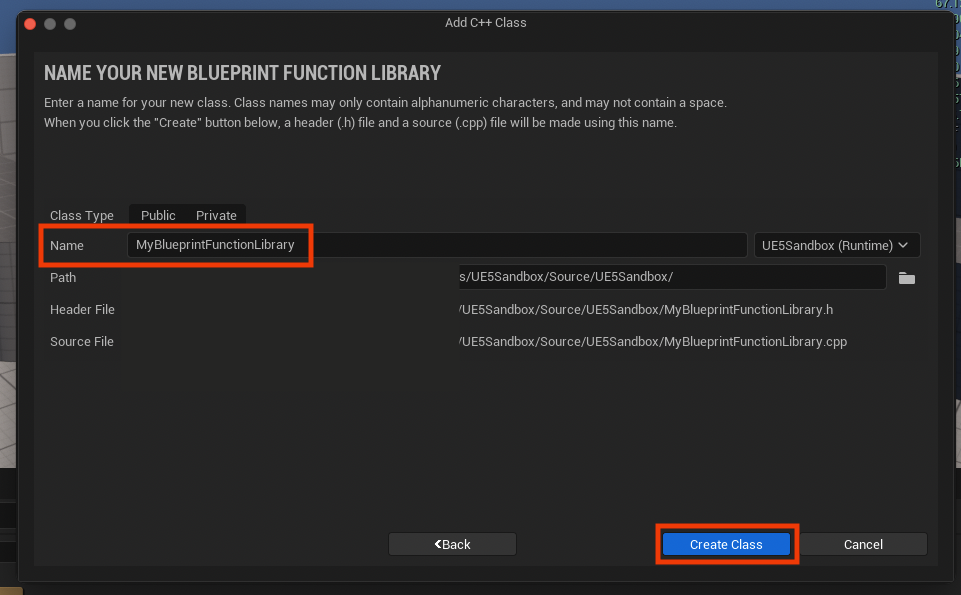
Adhering to Unreal Engine’s established naming conventions is highly recommended for maintainability and readability. This usually involves using clear, descriptive names with PascalCase (e.g., MyBlueprintFunctionLibrary, GameSaveLoadUtility). A well-chosen name immediately communicates the library’s purpose, a vital aspect in large-scale projects involving multiple developers. After naming, clicking "Create Class" initiates the compilation of the new C++ files, generating the necessary .h (header) and .cpp (source) files within the project’s source directory. This compilation process must complete successfully before any further C++ development can occur. This step effectively establishes the architectural backbone for the custom C++ functionality.
Developing Functionality within the IDE
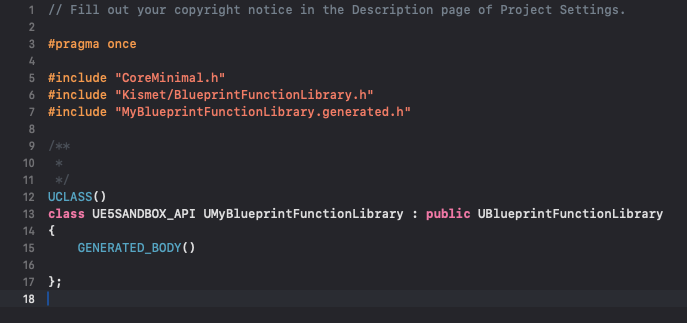
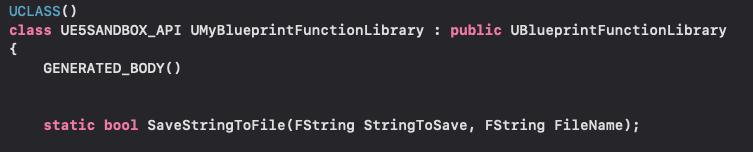
Upon successful compilation, the newly generated C++ files become accessible within the chosen IDE. For a class named MyBlueprintFunctionLibrary, the developer will find MyBlueprintFunctionLibrary.h and MyBlueprintFunctionLibrary.cpp. These files form the canvas for implementing the desired C++ logic. The header file (.h) is where function declarations are made, effectively defining the interface of the library, while the source file (.cpp) contains the actual implementation of these functions.

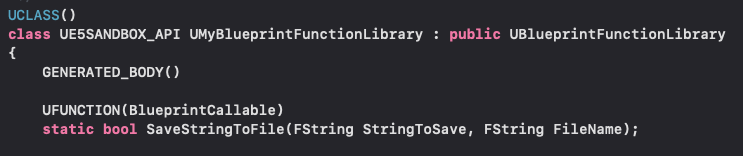
A critical element in exposing C++ functions to Blueprint is the use of specific Unreal Engine macros and keywords. Each function intended for Blueprint use must be declared static, meaning it can be called directly on the class itself without needing an instance of that class. This simplifies Blueprint integration, as developers won’t need to create or reference an object to use the function. Furthermore, the UFUNCTION() macro must preface the function declaration. This macro is a powerful tool provided by Unreal Engine’s reflection system, signaling to the engine that this particular C++ function should be exposed and accessible within the Blueprint editor. Various specifiers can be added to UFUNCTION() to control its behavior, such as BlueprintCallable for general use, BlueprintPure for functions without side effects, and Category for organizing nodes in the Blueprint editor.
As a practical example, consider implementing a simple string read and write system. Within the MyBlueprintFunctionLibrary.h file, declarations for SaveStringToFile and LoadStringFromFile would be added:
// MyBlueprintFunctionLibrary.h
#pragma once

#include "CoreMinimal.h"
#include "Kismet/BlueprintFunctionLibrary.h"
#include "MyBlueprintFunctionLibrary.generated.h"

UCLASS()
class UMyBlueprintFunctionLibrary : public UBlueprintFunctionLibrary

    GENERATED_BODY()

public:
    UFUNCTION(BlueprintCallable, Category = "File I/O")
    static bool SaveStringToFile(const FString& InString, const FString& Filename);

    UFUNCTION(BlueprintPure, Category = "File I/O")
    static FString LoadStringFromFile(const FString& Filename, bool& bOutSuccess);
;
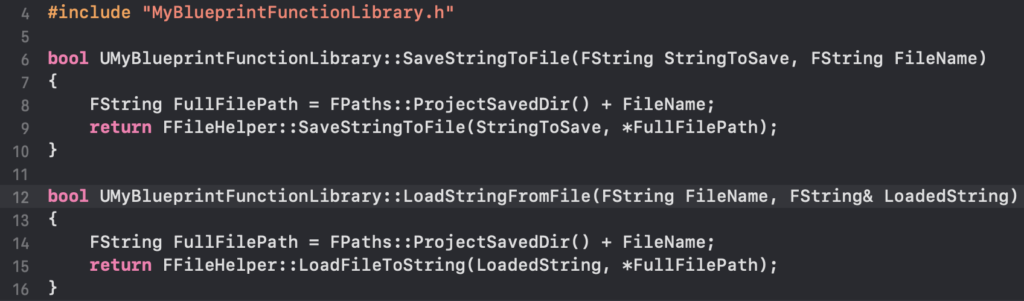
Following the declarations, the corresponding implementations are written in the MyBlueprintFunctionLibrary.cpp file. For file operations, Unreal Engine provides robust helper classes, such as FFileHelper. This class simplifies common file tasks, abstracting away platform-specific file system complexities.
// MyBlueprintFunctionLibrary.cpp
#include "MyBlueprintFunctionLibrary.h"
#include "Misc/FileHelper.h"
#include "HAL/PlatformFileManager.h"

bool UMyBlueprintFunctionLibrary::SaveStringToFile(const FString& InString, const FString& Filename)

    FString AbsoluteFilePath = FPaths::ProjectSavedDir() + Filename; // Or any other desired path
    return FFileHelper::SaveStringToFile(InString, *AbsoluteFilePath);


FString UMyBlueprintFunctionLibrary::LoadStringFromFile(const FString& Filename, bool& bOutSuccess)

    FString ResultString;
    FString AbsoluteFilePath = FPaths::ProjectSavedDir() + Filename; // Or any other desired path
    bOutSuccess = FFileHelper::LoadFileToString(ResultString, *AbsoluteFilePath);
    return ResultString;
This simple example demonstrates how powerful C++ functionality, such as direct file system interaction, can be encapsulated and made accessible to Blueprint. After adding or modifying C++ code, it is imperative to recompile the project. This can typically be done from within the Unreal Editor (e.g., "Compile" button in the toolbar) or directly from the IDE. Recompilation updates the engine’s understanding of the C++ codebase, making new functions available in Blueprint.
Accessing and Demonstrating within Blueprints
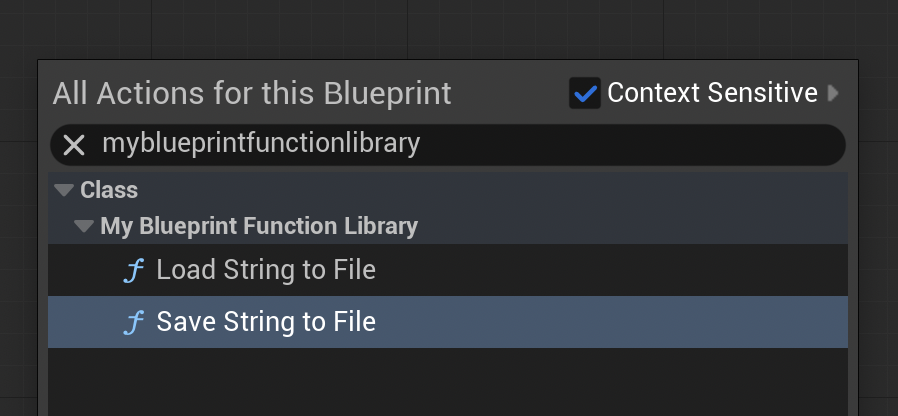
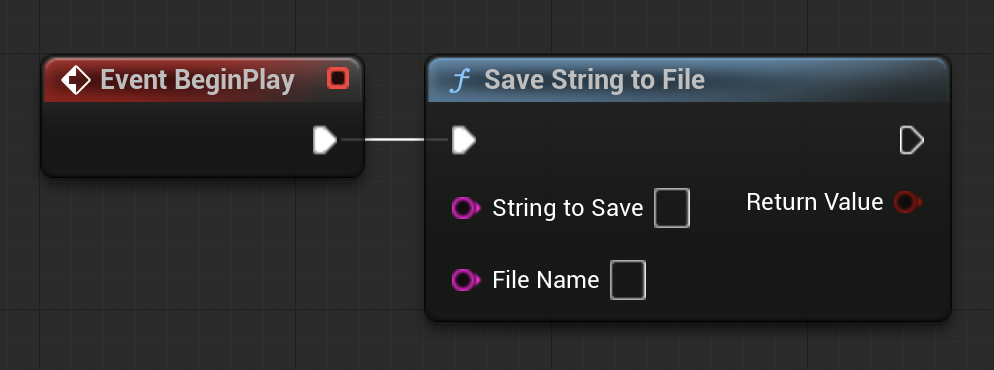
Upon successful recompilation and relaunch of the Unreal Editor, the newly created C++ functions become discoverable within the Blueprint environment. In any Blueprint editor (e.g., Level Blueprint, Character Blueprint, Widget Blueprint), a right-click will bring up the context-sensitive action menu. Typing the name of the C++ Blueprint Function Library (e.g., "MyBlueprintFunctionLibrary") or the specific function names (e.g., "Save String to File") will reveal the corresponding Blueprint nodes. These nodes will appear with the specified Category and will behave just like native Blueprint nodes, accepting inputs and providing outputs as defined in their C++ signatures.
To illustrate their functionality, consider a practical demonstration:
-
Saving a String: In a Level Blueprint, an
Event BeginPlaynode can be linked to theSave String to FileC++ function. A literal string, such as "Save Test Content," can be provided as theInStringinput, and a filename, like "testfile.txt," as theFilename. When the game is played in the editor, this function executes, writing the specified string to a file namedtestfile.txtwithin the project’s/Saveddirectory. Verification involves simply navigating to this directory to confirm the file’s creation and content.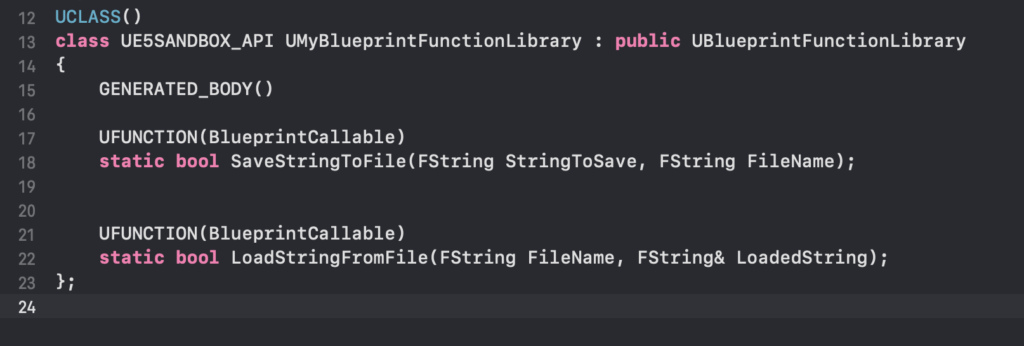
-
Loading a String: To demonstrate loading, a separate text file, for example,
loadtest.txt, can be manually created in the/Savedfolder with content like "Loading Test Content." In the Level Blueprint, anEvent BeginPlaynode can then be connected to theLoad String from FileC++ function, specifying "loadtest.txt" as theFilename. The outputFStringfrom this function can then be connected to aPrint Stringnode. Upon playing the project, the "Loading Test Content" string will appear on the screen, confirming the successful execution of the C++ function and its seamless integration with Blueprint’s visual output.
Broader Implications and Strategic Advantages
The strategic integration of C++ Blueprint Function Libraries yields significant advantages beyond simple code execution:
- Tangible Performance Improvements: For processes like complex mathematical calculations, large array manipulations, pathfinding algorithms, or real-time physics interactions, moving logic to C++ can result in orders of magnitude performance gains. This directly translates to smoother gameplay, higher frame rates, and more responsive user experiences, crucial for competitive or graphically demanding titles.
- Access to Advanced Engine Features: Many advanced functionalities within Unreal Engine, including specific rendering pipelines, network protocols, or integration with external SDKs, are primarily exposed through C++. Blueprint Function Libraries provide a clean conduit to harness these capabilities without forcing the entire project into a C++-only paradigm.
- Enhanced Maintainability and Scalability: By centralizing performance-critical or low-level logic in C++ libraries, projects become more organized. This separation of concerns improves code maintainability and allows for more robust error handling and debugging within the C++ layer. As projects grow, this hybrid structure ensures that the underlying systems remain efficient while design iteration continues unimpeded in Blueprint.
- Optimized Team Collaboration: This approach fosters effective collaboration between C++ programmers and Blueprint-focused designers. Programmers can develop highly optimized and stable C++ backend systems, providing a well-defined API (Application Programming Interface) for designers to consume through Blueprint nodes. This division of labor allows each team member to work in their preferred environment, maximizing productivity.
- Future-Proofing Projects: As hardware capabilities evolve and player expectations for game fidelity increase, the demand for highly optimized code will only grow. Projects built with a judicious blend of Blueprint and C++ are better positioned to adapt to future performance requirements and leverage emerging technologies.
In conclusion, the C++ Blueprint Function Library stands as an indispensable tool for serious game development in Unreal Engine 5. It offers a powerful, yet flexible, pathway to overcoming Blueprint’s performance limitations and unlocking the full spectrum of C++ functionality. By enabling developers to selectively optimize critical sections of their code while maintaining the agility of visual scripting, these libraries are instrumental in building high-performance, scalable, and maintainable game projects. Their strategic adoption represents a mature approach to Unreal Engine development, harmonizing the strengths of both C++ and Blueprint to deliver exceptional interactive experiences.
Further Reading
- Official blueprint function library documentation from Epic Games
- Click here to read more of our C++ guides for Unreal Engine
About the Author








